

Debugging Backend Code: A Beginner’s Survival Guide
The skill that separates developers who ship from developers who suffer. Here’s how to find bugs in minutes instead of hours.


You’ve been staring at the same code for two hours.
It should work. The logic makes sense. You’ve read every line fifteen times. But something is broken, and you have no idea what.
Sound familiar?
Every developer has been there. The difference between a junior who stays stuck for days and a senior who fixes it in minutes isn’t intelligence — it’s debugging skill.
Here’s the truth nobody tells beginners: writing code is maybe 30% of programming. The rest is figuring out why it doesn’t work.
Yet tutorials never teach debugging. They show you how to write a for loop, but not how to figure out why your for loop is processing the wrong data.
This guide is the debugging crash course I wish I had starting out. We’ll cover the mindset, the tools, and the techniques that will make you dramatically faster at finding and fixing bugs.
Let’s turn you into a debugging machine.
The Debugging Mindset
Before we talk tools, let’s talk mindset. How you think about bugs matters more than what tools you use.
Principle 1: The Code Is Doing Exactly What You Told It To
The computer isn’t wrong. It’s not random. It’s not “weird.”
Your code is executing exactly as written. The bug is in the gap between what you think you wrote and what you actually wrote.
# You think this checks if user is admin
if user.role == “Admin”:
    grant_access()

# But it doesn’t work because the data is “admin” (lowercase)
# The computer did exactly what you said: compare to “Admin”
The fix: Stop asking “why isn’t this working?” Start asking “what is this code actually doing?”
Principle 2: Bugs Are Not Random
Every bug has a cause. If it seems random, you don’t understand the cause yet.
“It works sometimes” means there’s a condition you haven’t identified. “It broke for no reason” means something changed that you haven’t noticed.
The fix: Assume determinism. Find the pattern.
Principle 3: The Bug Is Usually Not Where You Think
You’ve been staring at the function you suspect. But the bug is often:
In the data coming into the function
In how the function’s output is used
In a completely different part of the codebase
In a library or dependency
In the environment (wrong database, wrong config)
The fix: Widen your search. Don’t tunnel vision on one place.
Principle 4: Assumptions Are the Enemy
“I know this part works” — but do you? Have you verified it?
Most debugging time is wasted because we assume things we shouldn’t:
“The data is definitely in the right format”
“This function definitely returns what I expect”
“The config is definitely loaded correctly”
The fix: Verify everything. Trust nothing until you’ve seen it with your own eyes.
The Debugging Process
Here’s a systematic approach that works for any bug:
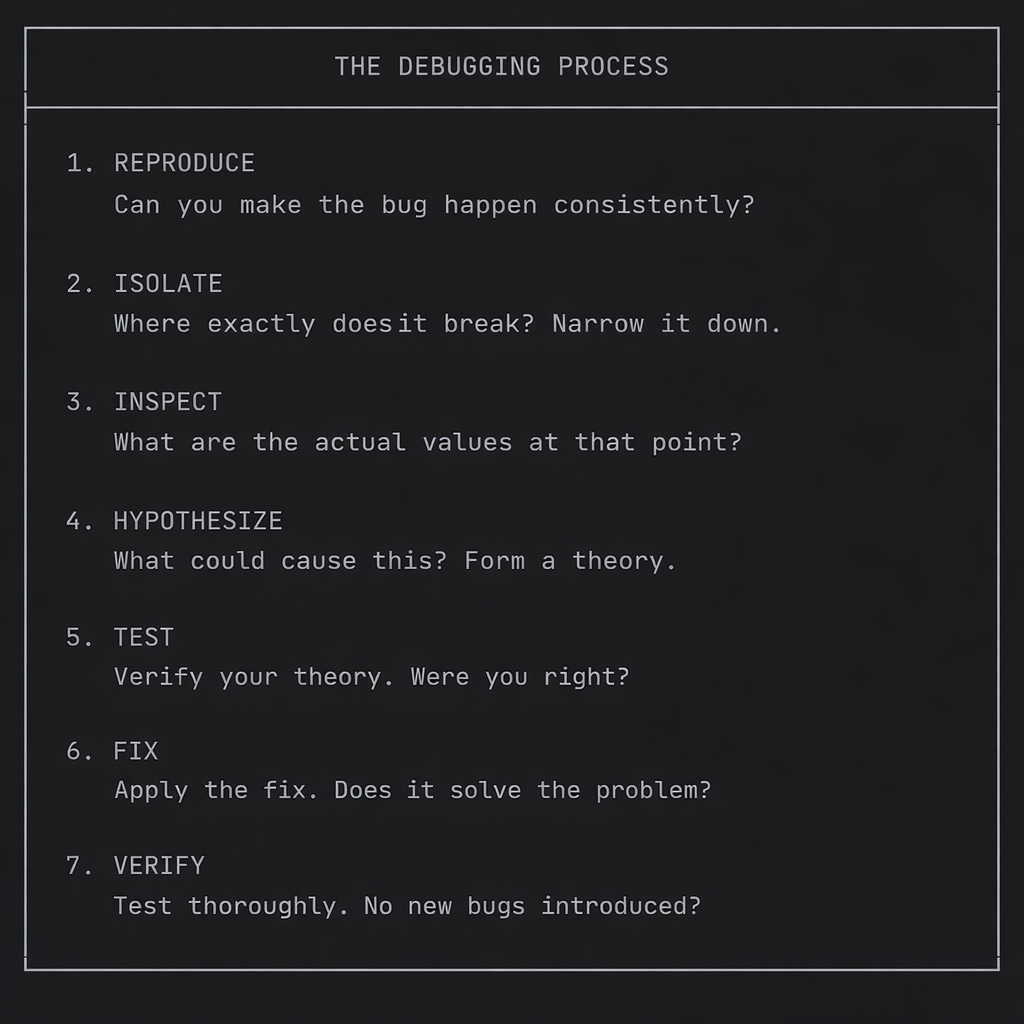
Let’s go through each step.
Step 1: Reproduce the Bug
If you can’t reproduce it, you can’t debug it.
Make It Consistent
# Bad: “It fails sometimes”
# Good: “It fails every time I do X with Y data”

# Find the exact steps:
1. Log in as user@example.com
2. Go to /dashboard
3. Click “Export”
4. Error appears
Simplify the Reproduction
# Instead of debugging through the whole app...
# Create a minimal script that reproduces the bug

# test_bug.py
from myapp.services import process_order

# Minimal data that triggers the bug
test_order = {”id”: 123, “items”: [], “total”: 0}

# Run just the problematic code
result = process_order(test_order)
print(result)
The simpler your reproduction case, the faster you’ll find the bug.
Step 2: Isolate the Problem
Narrow down where the bug occurs.
Binary Search Your Code
If you don’t know where the bug is, cut the problem in half:
def complex_function(data):
    step1_result = step1(data)
    print(f”After step 1: {step1_result}”)  # Check here

    step2_result = step2(step1_result)
    print(f”After step 2: {step2_result}”)  # Check here

    step3_result = step3(step2_result)
    print(f”After step 3: {step3_result}”)  # Check here

    return step3_result

# If step 1 is correct but step 2 is wrong, the bug is in step2()
Check Boundaries
Bugs often live at boundaries:
Where data enters your system (API endpoints, file reads)
Where data moves between functions
Where data leaves your system (database writes, API responses)
@app.post(”/users”)
def create_user(request):
    # BOUNDARY: Data coming in
    print(f”Request data: {request.json}”)

    user = User(**request.json)
    # BOUNDARY: Data transformation
    print(f”User object: {user.__dict__}”)

    db.save(user)
    # BOUNDARY: Data going out

    return {”id”: user.id}
Step 3: Inspect the Actual Values
Don’t guess what values are. Look at them.
The Print Statement (Old Faithful)
def calculate_discount(price, user):
    print(f”DEBUG: price={price}, type={type(price)}”)
    print(f”DEBUG: user={user}, tier={user.tier}”)

    if user.tier == “premium”:
        discount = price * 0.2
    else:
        discount = 0

    print(f”DEBUG: discount={discount}”)
    return discount
Pro tips for print debugging:
Include variable names:
print(f"price={price}")not justprint(price)Include types:
print(f"price={price}, type={type(price)}")Use a prefix:
print(f"DEBUG: ...")so you can find/remove them laterPrint before AND after operations
Logging (Better Than Print)
import logging

logging.basicConfig(level=logging.DEBUG)
logger = logging.getLogger(__name__)

def calculate_discount(price, user):
    logger.debug(f”Calculating discount: price={price}, user_tier={user.tier}”)

    if user.tier == “premium”:
        discount = price * 0.2
        logger.debug(f”Applied premium discount: {discount}”)
    else:
        discount = 0
        logger.debug(”No discount applied”)

    return discount
Why logging is better:
Easy to enable/disable via log level
Includes timestamps
Can go to files, not just console
Can stay in production code (at appropriate levels)
The Debugger (Most Powerful)
Every language has a debugger. Learn to use it.
Python (pdb):
def problematic_function(data):
    import pdb; pdb.set_trace()  # Execution stops here

    # Now you can:
    # - Type variable names to see their values
    # - Type ‘n’ to go to next line
    # - Type ‘s’ to step into a function
    # - Type ‘c’ to continue execution
    # - Type ‘p expression’ to print any expression

    result = process(data)
    return result
Python (breakpoint — Python 3.7+):
def problematic_function(data):
    breakpoint()  # Cleaner syntax, same effect
    result = process(data)
    return result
VS Code Debugging:
Click left of line number to set breakpoint (red dot)
Press F5 to start debugging
Hover over variables to see values
Use Debug Console to evaluate expressions
PyCharm Debugging:
Click left gutter to set breakpoint
Right-click → Debug
Variables panel shows all values
Evaluate Expression tool for complex queries
Step 4: Common Bug Patterns
Most bugs fall into recognizable categories. Learn to spot them.
Bug Pattern 1: Off-By-One Errors
# Bug: Missing the last item
for i in range(len(items) - 1):  # Should be range(len(items))
    process(items[i])

# Bug: Index out of bounds
items = [1, 2, 3]
print(items[3])  # IndexError! Valid indices are 0, 1, 2

# Bug: Wrong boundary in condition
if score >= 90:  # A or...
    grade = “A”
elif score >= 80:  # B
    grade = “B”
elif score > 70:  # Bug! 70 exactly falls through
    grade = “C”
Bug Pattern 2: Type Mismatches
# Bug: String vs Integer
user_id = request.args.get(”id”)  # Returns “42” (string)
user = db.query(User).filter(User.id == user_id).first()
# Might fail because User.id is integer, user_id is string

# Fix
user_id = int(request.args.get(”id”))

# Bug: None not handled
def get_user_name(user_id):
    user = db.get_user(user_id)
    return user.name  # AttributeError if user is None!

# Fix
def get_user_name(user_id):
    user = db.get_user(user_id)
    if user is None:
        return None  # or raise an exception
    return user.name
Bug Pattern 3: Mutation Bugs
# Bug: Mutating shared data
default_config = {”debug”: False, “items”: []}

def process(config=default_config):
    config[”items”].append(”new”)  # Mutates the default!
    return config

process()  # default_config now has [”new”]
process()  # default_config now has [”new”, “new”]

# Fix: Don’t use mutable defaults
def process(config=None):
    if config is None:
        config = {”debug”: False, “items”: []}
    config[”items”].append(”new”)
    return config
Bug Pattern 4: Async/Timing Bugs
# Bug: Not awaiting async function
async def get_user(user_id):
    return await db.fetch_user(user_id)

async def handler():
    user = get_user(42)  # Missing await! user is a coroutine, not data
    print(user.name)  # AttributeError

# Fix
async def handler():
    user = await get_user(42)
    print(user.name)
Bug Pattern 5: State Bugs
# Bug: Stale state
class Counter:
    count = 0  # Class variable! Shared between all instances

    def increment(self):
        self.count += 1

c1 = Counter()
c2 = Counter()
c1.increment()
print(c2.count)  # 1 (unexpected!)

# Fix: Instance variable
class Counter:
    def __init__(self):
        self.count = 0  # Instance variable
Bug Pattern 6: Environment Bugs
# Bug: Works locally, fails in production
# Possible causes:
# - Different Python version
# - Missing environment variable
# - Different database data
# - Different file paths
# - Missing dependency

# Debug by checking environment
import sys
import os

print(f”Python: {sys.version}”)
print(f”DATABASE_URL set: {’DATABASE_URL’ in os.environ}”)
print(f”Working directory: {os.getcwd()}”)
Step 5: Reading Error Messages
Error messages tell you exactly what’s wrong. Learn to read them.
Anatomy of a Python Traceback
Traceback (most recent call last):
  File “app.py”, line 45, in <module>
    result = process_order(order_data)
  File “services.py”, line 23, in process_order
    total = calculate_total(items)
  File “utils.py”, line 12, in calculate_total
    return sum(item.price for item in items)
  File “utils.py”, line 12, in <genexpr>
    return sum(item.price for item in items)
AttributeError: ‘dict’ object has no attribute ‘price’
How to read it:
Start at the bottom — That’s the actual error
AttributeError: 'dict' object has no attribute 'price'Translation: You tried to access
.priceon a dictionary
2. Read the last file/line — That’s where it happened
File "utils.py", line 12The error occurred in
utils.pyat line 12
3. Read upward — That’s how you got there
process_ordercalledcalculate_totalwhich hit the error
4. Identify the root cause — Often not where the error occurred
The bug might be in
process_orderpassing dicts instead of objects
Common Error Types
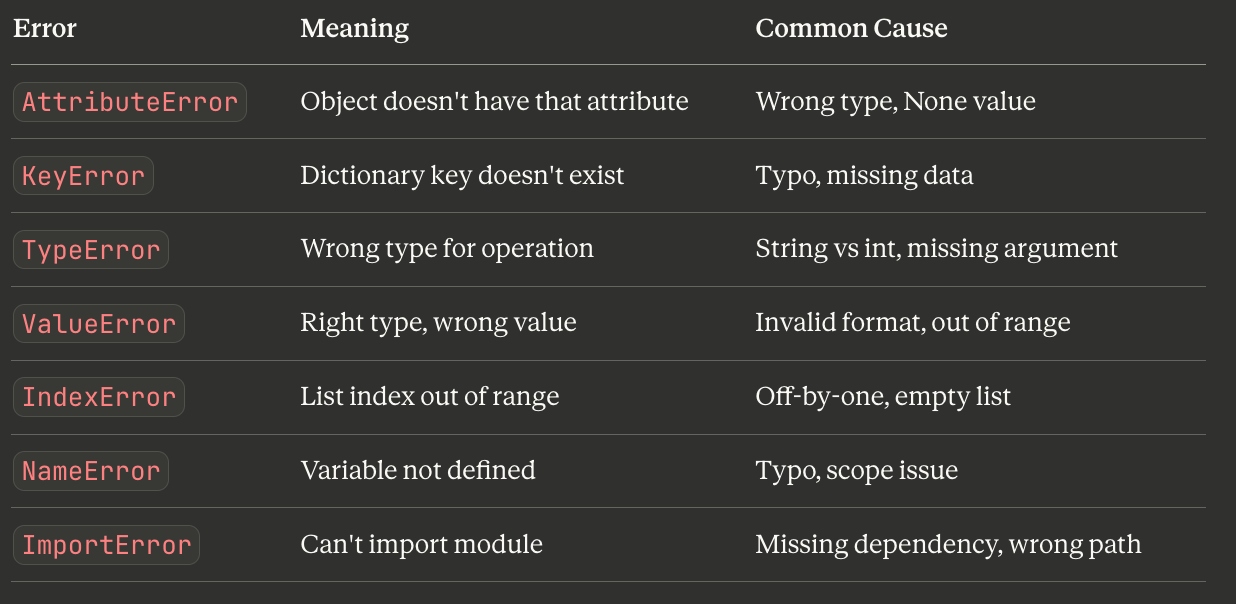
Step 6: Debugging Tools
Python-Specific Tools
Rich for better tracebacks:
# Install: pip install rich
from rich import traceback
traceback.install(show_locals=True)

# Now errors show local variable values!
icecream for better printing:
# Install: pip install icecream
from icecream import ic

x = 42
ic(x)  # Prints: ic| x: 42

result = some_function()
ic(result)  # Prints: ic| result: <whatever result is>

# Even works for expressions
ic(len(my_list), my_list[0])
PySnooper for automatic tracing:
# Install: pip install pysnooper
import pysnooper

@pysnooper.snoop()
def problematic_function(x):
    y = x * 2
    z = y + 1
    return z

# Automatically logs every line execution and variable change
API Debugging Tools
HTTP requests (curl):
# See exactly what’s being sent/received
curl -v http://localhost:8000/api/users

# With JSON body
curl -v -X POST http://localhost:8000/api/users \
  -H “Content-Type: application/json” \
  -d ‘{”name”: “John”}’
HTTPie (better curl):
# Install: pip install httpie
http GET localhost:8000/api/users
http POST localhost:8000/api/users name=John email=john@example.com
Postman/Insomnia:
Visual API testing
Save request collections
See response times, headers, everything
Database Debugging
# See the actual SQL being executed
# SQLAlchemy
import logging
logging.getLogger(’sqlalchemy.engine’).setLevel(logging.DEBUG)

# Django
LOGGING = {
    ‘handlers’: {
        ‘console’: {’class’: ‘logging.StreamHandler’},
    },
    ‘loggers’: {
        ‘django.db.backends’: {
            ‘level’: ‘DEBUG’,
            ‘handlers’: [’console’],
        },
    },
}
-- Check what’s in the database
SELECT * FROM users WHERE id = 42;
-- Check recent entries
SELECT * FROM orders ORDER BY created_at DESC LIMIT 10;Step 7: When You’re Stuck
Take a Break
Seriously. Walk away. Get coffee. Sleep on it.
Your brain processes problems in the background. Many bugs are solved in the shower or on a walk.
Rubber Duck Debugging
Explain the problem out loud. To a rubber duck, a colleague, your cat — doesn’t matter.
The act of articulating the problem often reveals the solution:
“So the function receives user data, then it… wait, it never validates the input!”
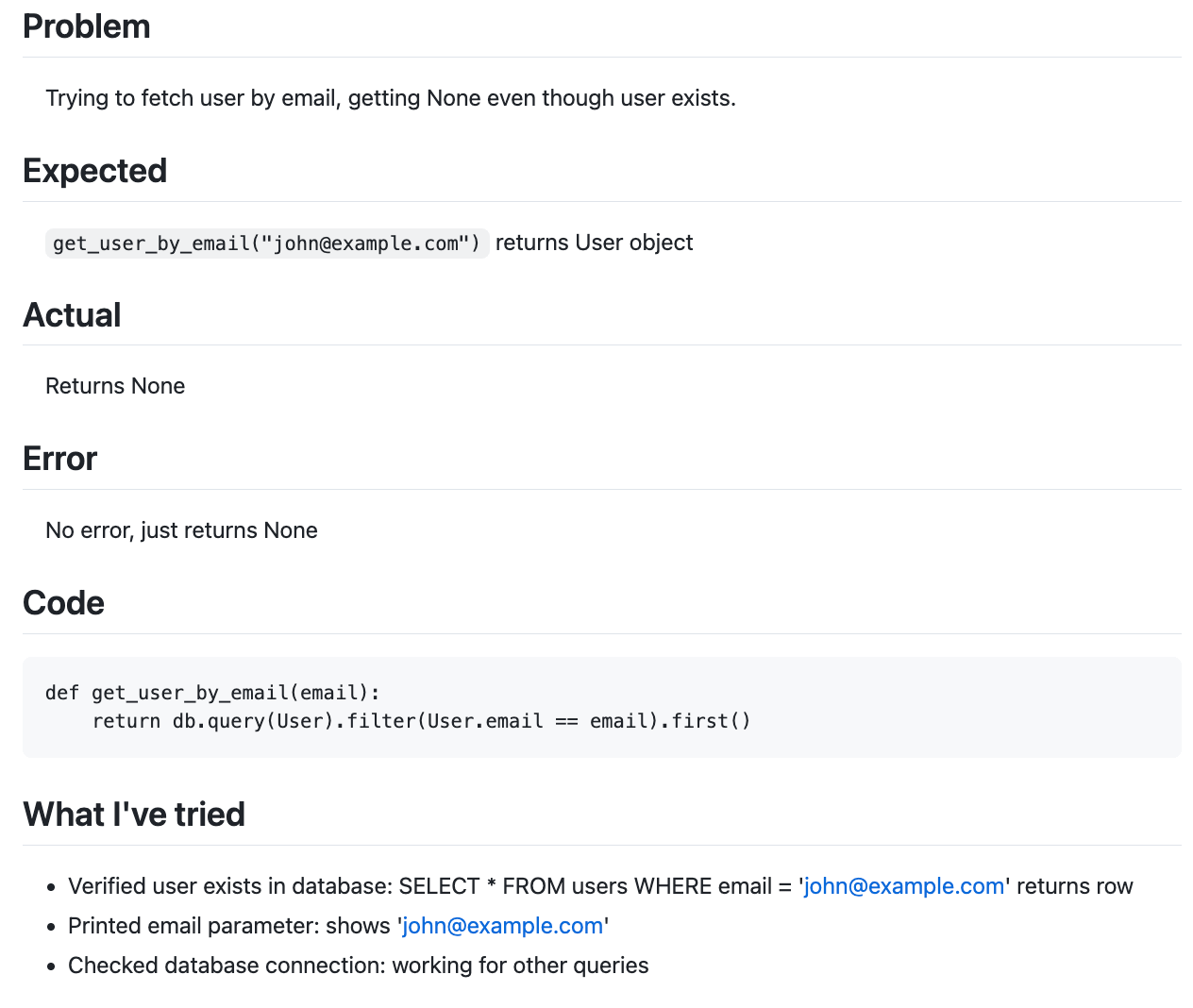
Ask for Help (The Right Way)
When asking for help, provide:
What you’re trying to do
What you expected to happen
What actually happened
The exact error message
What you’ve already tried
Minimal code to reproduce
Search Effectively
Good: “Python AttributeError NoneType has no attribute get”
Bad: “my code doesn’t work”

Good: “SQLAlchemy filter returns None existing record”
Bad: “database query not working”

Good: “FastAPI 422 validation error pydantic”
Bad: “API error”
Include:
Language/framework name
Exact error message
Specific operation
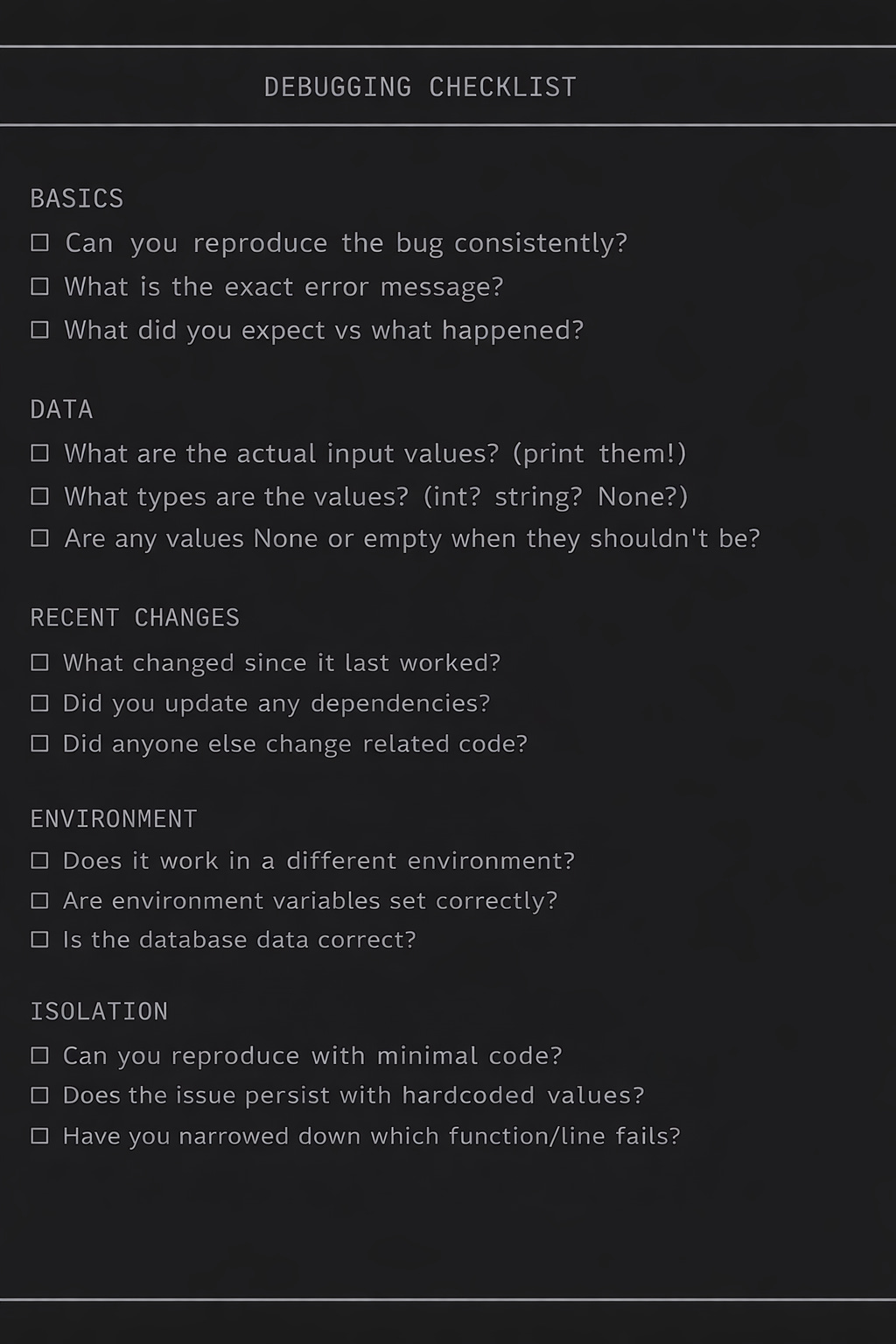
Debugging Checklist
The Bottom Line
Debugging is a skill. Like any skill, it gets better with practice.
The key principles:
Be systematic — Follow a process, don’t randomly change things
Verify assumptions — Print everything, trust nothing
Read error messages — They tell you what’s wrong
Isolate the problem — Narrow down where the bug lives
Know the common patterns — Most bugs fit familiar categories
You will get faster. What takes hours now will take minutes with practice. The best debuggers aren’t smarter — they’ve just seen more bugs.
Now go find some bugs.
Learning backend development? I share practical engineering tips weekly. Follow along.
Originally published by Anas Issath — Backend engineer. Building systems that scale, securing what ships, and teaching what I’ve broken in production.