

Django 5.2’s Composite Primary Keys: The Feature We’ve Waited 20 Years For
When to Use Them, When to Avoid Them, and How to Implement Them Right


For nearly two decades, Django developers had one answer when someone asked about composite primary keys: “You can’t. Use a surrogate key.”
That changed in April 2025.
Django 5.2 introduced CompositePrimaryKey — a feature the community has requested since Django’s earliest days. It’s a big deal for certain use cases, but it’s not a silver bullet. Use it wrong, and you’ll create more problems than you solve.
Today, I’ll show you exactly when composite primary keys make sense, when they don’t, and how to implement them correctly in production Django applications.
Let’s dig in.
What Are Composite Primary Keys?
A primary key uniquely identifies each row in a database table. Traditionally, Django uses a single auto-incrementing integer (or UUID) as the primary key:
class Product(models.Model):
    id = models.BigAutoField(primary_key=True)  # Django adds this automatically
    name = models.CharField(max_length=255)
A composite primary key uses multiple columns together as the unique identifier:
-- SQL example
CREATE TABLE order_items (
    order_id INTEGER,
    product_id INTEGER,
    quantity INTEGER,
    PRIMARY KEY (order_id, product_id)  -- Composite: two columns together
);
In this example, neither order_id nor product_id alone is unique — but the combination is. You can have product 5 in order 100 and product 5 in order 101, but not product 5 twice in order 100.
The Django 5.2 Syntax
Here’s how you define composite primary keys in Django 5.2:
from django.db import models


class OrderItem(models.Model):
    pk = models.CompositePrimaryKey(’order_id’, ‘product_id’)

    order = models.ForeignKey(’Order’, on_delete=models.CASCADE)
    product = models.ForeignKey(’Product’, on_delete=models.CASCADE)
    quantity = models.PositiveIntegerField(default=1)
    unit_price = models.DecimalField(max_digits=10, decimal_places=2)

    class Meta:
        db_table = ‘order_items’
Key points:
Use
pkas the field name — This is required by DjangoReference field names as strings —
'order_id'notorderororder_idNo separate
idfield — The composite key replaces the auto-generated primary keyOrder matters — The order of fields affects index efficiency
Accessing the Primary Key
item = OrderItem.objects.first()

# The pk is a tuple
print(item.pk)  # (1, 42) - (order_id, product_id)

# You can still access individual fields
print(item.order_id)   # 1
print(item.product_id) # 42

# Querying by composite pk
item = OrderItem.objects.get(pk=(1, 42))

# Or by individual fields
item = OrderItem.objects.get(order_id=1, product_id=42)
When Composite Primary Keys Make Sense
Not every table needs a composite primary key. Here are the legitimate use cases:
1. Junction Tables with Extra Data
The classic use case — a many-to-many relationship that needs additional fields:
class StudentCourse(models.Model):
    “”“
    Tracks which students are enrolled in which courses,
    plus enrollment-specific data.
    “”“
    pk = models.CompositePrimaryKey(’student_id’, ‘course_id’)

    student = models.ForeignKey(’Student’, on_delete=models.CASCADE)
    course = models.ForeignKey(’Course’, on_delete=models.CASCADE)

    enrolled_at = models.DateTimeField(auto_now_add=True)
    grade = models.CharField(max_length=2, null=True, blank=True)
    is_auditing = models.BooleanField(default=False)

    class Meta:
        db_table = ‘student_courses’
Before Django 5.2, you’d add a surrogate id and a unique constraint. Now the primary key itself enforces uniqueness.
2. Event/Audit Logs
When tracking events where the combination of entity + timestamp (or event type) is naturally unique:
class OrderStatusHistory(models.Model):
    “”“
    Tracks all status changes for an order.
    An order can only have one status change at a given timestamp.
    “”“
    pk = models.CompositePrimaryKey(’order_id’, ‘changed_at’)

    order = models.ForeignKey(’Order’, on_delete=models.CASCADE)
    changed_at = models.DateTimeField(auto_now_add=True)

    old_status = models.CharField(max_length=20)
    new_status = models.CharField(max_length=20)
    changed_by = models.ForeignKey(’users.User’, on_delete=models.SET_NULL, null=True)
    notes = models.TextField(blank=True)

    class Meta:
        db_table = ‘order_status_history’
3. Time-Series Data
For data that’s naturally keyed by entity + time period:
class DailyProductStats(models.Model):
    “”“
    Daily aggregated statistics for products.
    One row per product per day.
    “”“
    pk = models.CompositePrimaryKey(’product_id’, ‘date’)

    product = models.ForeignKey(’Product’, on_delete=models.CASCADE)
    date = models.DateField()

    views = models.PositiveIntegerField(default=0)
    add_to_carts = models.PositiveIntegerField(default=0)
    purchases = models.PositiveIntegerField(default=0)
    revenue = models.DecimalField(max_digits=12, decimal_places=2, default=0)

    class Meta:
        db_table = ‘daily_product_stats’
4. Multi-Tenant Data
When tenant isolation is part of your data model:
class TenantUser(models.Model):
    “”“
    Users scoped to a specific tenant.
    The same user_id can exist in different tenants.
    “”“
    pk = models.CompositePrimaryKey(’tenant_id’, ‘user_id’)

    tenant = models.ForeignKey(’Tenant’, on_delete=models.CASCADE)
    user_id = models.CharField(max_length=100)  # External user ID

    email = models.EmailField()
    role = models.CharField(max_length=50)
    is_active = models.BooleanField(default=True)

    class Meta:
        db_table = ‘tenant_users’
5. Legacy Database Integration
When you’re connecting Django to an existing database that uses composite keys:
class LegacyInventory(models.Model):
    “”“
    Maps to an existing inventory table with composite PK.
    “”“
    pk = models.CompositePrimaryKey(’warehouse_code’, ‘sku’)

    warehouse_code = models.CharField(max_length=10)
    sku = models.CharField(max_length=50)

    quantity = models.IntegerField()
    last_updated = models.DateTimeField()

    class Meta:
        managed = False  # Don’t let Django manage this table
        db_table = ‘legacy_inventory’
When NOT to Use Composite Primary Keys
Composite keys aren’t always the right choice. Avoid them in these situations:
1. When You Need Foreign Keys to the Table
This is the biggest limitation. Django 5.2 does not support ForeignKey pointing to models with composite primary keys.
# THIS DOESN’T WORK IN DJANGO 5.2
class OrderItem(models.Model):
    pk = models.CompositePrimaryKey(’order_id’, ‘product_id’)
    order = models.ForeignKey(’Order’, on_delete=models.CASCADE)
    product = models.ForeignKey(’Product’, on_delete=models.CASCADE)


class OrderItemNote(models.Model):
    # ERROR: Can’t reference OrderItem with composite PK
    order_item = models.ForeignKey(’OrderItem’, on_delete=models.CASCADE)
    note = models.TextField()
If other tables need to reference this table, use a surrogate key.
2. For Standard Domain Entities
Users, products, orders, articles — these should have simple primary keys:
# WRONG - Don’t use composite PK for regular entities
class User(models.Model):
    pk = models.CompositePrimaryKey(’email’, ‘tenant_id’)  # Bad idea
    ...

# RIGHT - Use UUID or auto-increment
class User(models.Model):
    id = models.UUIDField(primary_key=True, default=uuid.uuid4)
    email = models.EmailField()
    tenant = models.ForeignKey(’Tenant’, on_delete=models.CASCADE)

    class Meta:
        constraints = [
            models.UniqueConstraint(fields=[’email’, ‘tenant’], name=’unique_email_per_tenant’)
        ]
3. When You Need Django Admin
Django’s admin doesn’t fully support composite primary keys in 5.2. URLs, editing, and some features break.
If you need admin access to the data, either:
Use a surrogate key
Build a custom admin interface
Wait for better admin support in future Django versions
4. When Component Fields Might Change
Primary keys should be immutable. If either component of your composite key might change, don’t use it as the primary key:
# BAD - Email can change
class UserPreference(models.Model):
    pk = models.CompositePrimaryKey(’user_email’, ‘preference_key’)
    user_email = models.EmailField()
    preference_key = models.CharField(max_length=50)
    value = models.JSONField()

# GOOD - User ID is stable
class UserPreference(models.Model):
    pk = models.CompositePrimaryKey(’user_id’, ‘preference_key’)
    user = models.ForeignKey(’User’, on_delete=models.CASCADE)
    preference_key = models.CharField(max_length=50)
    value = models.JSONField()
Implementation Patterns
Pattern 1: The Basic Junction Table
from django.db import models


class ProductCategory(models.Model):
    “”“Products can belong to multiple categories.”“”
    pk = models.CompositePrimaryKey(’product_id’, ‘category_id’)

    product = models.ForeignKey(
        ‘Product’,
        on_delete=models.CASCADE,
        related_name=’category_links’
    )
    category = models.ForeignKey(
        ‘Category’,
        on_delete=models.CASCADE,
        related_name=’product_links’
    )

    is_primary = models.BooleanField(default=False)
    display_order = models.PositiveIntegerField(default=0)
    added_at = models.DateTimeField(auto_now_add=True)

    class Meta:
        db_table = ‘product_categories’
Usage:
# Add product to category
ProductCategory.objects.create(
    product=product,
    category=category,
    is_primary=True
)

# Check if product is in category
exists = ProductCategory.objects.filter(
    product=product,
    category=category
).exists()

# Get all categories for a product
categories = Category.objects.filter(
    product_links__product=product
).order_by(’product_links__display_order’)

# Get primary category
primary = ProductCategory.objects.get(
    product=product,
    is_primary=True
)
Pattern 2: Versioned/Historical Data
class ContractVersion(models.Model):
    “”“
    Stores all versions of a contract.
    Each version is identified by contract + version number.
    “”“
    pk = models.CompositePrimaryKey(’contract_id’, ‘version’)

    contract = models.ForeignKey(
        ‘Contract’,
        on_delete=models.CASCADE,
        related_name=’versions’
    )
    version = models.PositiveIntegerField()

    content = models.TextField()
    created_at = models.DateTimeField(auto_now_add=True)
    created_by = models.ForeignKey(
        ‘users.User’,
        on_delete=models.SET_NULL,
        null=True
    )
    change_summary = models.CharField(max_length=500, blank=True)

    class Meta:
        db_table = ‘contract_versions’
Usage:
# Create new version
latest_version = ContractVersion.objects.filter(
    contract=contract
).aggregate(max_v=models.Max(’version’))[’max_v’] or 0

ContractVersion.objects.create(
    contract=contract,
    version=latest_version + 1,
    content=new_content,
    created_by=user,
    change_summary=’Updated payment terms’
)

# Get specific version
v2 = ContractVersion.objects.get(pk=(contract.id, 2))

# Get version history
history = ContractVersion.objects.filter(
    contract=contract
).order_by(’-version’)
Pattern 3: Time-Bucketed Metrics
class HourlyApiMetrics(models.Model):
    “”“
    API usage metrics aggregated by hour.
    “”“
    pk = models.CompositePrimaryKey(’api_key_id’, ‘hour’)

    api_key = models.ForeignKey(
        ‘ApiKey’,
        on_delete=models.CASCADE,
        related_name=’hourly_metrics’
    )
    hour = models.DateTimeField()  # Truncated to hour

    request_count = models.PositiveIntegerField(default=0)
    error_count = models.PositiveIntegerField(default=0)
    total_response_time_ms = models.PositiveIntegerField(default=0)
    bytes_transferred = models.BigIntegerField(default=0)

    class Meta:
        db_table = ‘hourly_api_metrics’

    @property
    def avg_response_time_ms(self):
        if self.request_count == 0:
            return 0
        return self.total_response_time_ms / self.request_count

    @classmethod
    def record_request(cls, api_key, response_time_ms, bytes_sent, is_error=False):
        “”“Record a single API request.”“”
        from django.utils import timezone
        from django.db.models import F

        hour = timezone.now().replace(minute=0, second=0, microsecond=0)

        obj, created = cls.objects.get_or_create(
            api_key=api_key,
            hour=hour,
            defaults={
                ‘request_count’: 1,
                ‘error_count’: 1 if is_error else 0,
                ‘total_response_time_ms’: response_time_ms,
                ‘bytes_transferred’: bytes_sent
            }
        )

        if not created:
            cls.objects.filter(pk=(api_key.id, hour)).update(
                request_count=F(’request_count’) + 1,
                error_count=F(’error_count’) + (1 if is_error else 0),
                total_response_time_ms=F(’total_response_time_ms’) + response_time_ms,
                bytes_transferred=F(’bytes_transferred’) + bytes_sent
            )
Migrations and Composite Keys
Creating a New Table with Composite PK
Django handles this automatically:
# models.py
class OrderItem(models.Model):
    pk = models.CompositePrimaryKey(’order_id’, ‘product_id’)
    order = models.ForeignKey(’Order’, on_delete=models.CASCADE)
    product = models.ForeignKey(’Product’, on_delete=models.CASCADE)
    quantity = models.PositiveIntegerField()
python manage.py makemigrations
python manage.py migrateThe generated migration creates the table with the composite primary key.
You Cannot Migrate TO Composite PK
This is a hard limitation. You cannot change an existing table from a single-column primary key to a composite primary key:
# This WILL NOT work
class Migration(migrations.Migration):
    operations = [
        # ERROR: Can’t add CompositePrimaryKey to existing table
        migrations.AddField(
            model_name=’orderitem’,
            name=’pk’,
            field=models.CompositePrimaryKey(’order_id’, ‘product_id’),
        ),
    ]
If you need composite keys on existing tables, you must:
Create a new table with composite PK
Migrate data from old table
Update foreign keys
Drop old table
Rename new table
This is complex and risky. Consider whether it’s worth it.
Performance Considerations
Index Structure
A composite primary key creates a composite index. The order of fields matters:
# Index is on (order_id, product_id) in that order
pk = models.CompositePrimaryKey(’order_id’, ‘product_id’)
This index efficiently supports:
WHERE order_id = ?WHERE order_id = ? AND product_id = ?
It does not efficiently support:
WHERE product_id = ?(needs separate index)
If you frequently query by the second field alone, add an index:
class OrderItem(models.Model):
    pk = models.CompositePrimaryKey(’order_id’, ‘product_id’)
    order = models.ForeignKey(’Order’, on_delete=models.CASCADE)
    product = models.ForeignKey(’Product’, on_delete=models.CASCADE)

    class Meta:
        indexes = [
            # For queries like: OrderItem.objects.filter(product=product)
            models.Index(fields=[’product’], name=’orderitem_product_idx’),
        ]
Comparison with Surrogate Keys
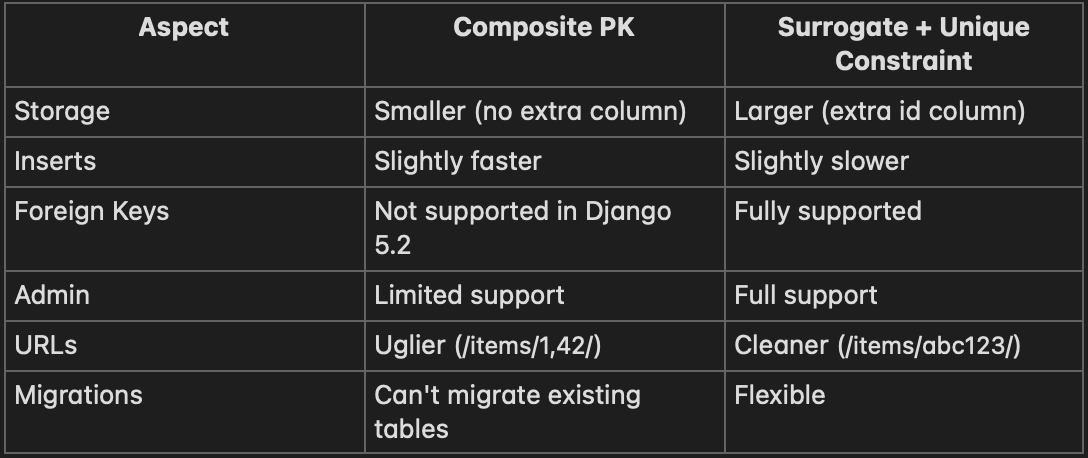
Working Around the ForeignKey Limitation
If you need to reference a composite-PK table from another table, here’s a workaround using ForeignObject:
from django.db.models import ForeignObject


class OrderItemNote(models.Model):
    id = models.BigAutoField(primary_key=True)

    # Store the composite key components
    order_id = models.BigIntegerField()
    product_id = models.BigIntegerField()

    # Create a virtual relationship
    order_item = ForeignObject(
        ‘OrderItem’,
        on_delete=models.DO_NOTHING,
        from_fields=[’order_id’, ‘product_id’],
        to_fields=[’order_id’, ‘product_id’],
        related_name=’notes’
    )

    note = models.TextField()
    created_at = models.DateTimeField(auto_now_add=True)

    class Meta:
        db_table = ‘order_item_notes’
This is an advanced pattern. The database won’t enforce referential integrity, so you must handle it in application code.
Key Takeaways
1. Composite PKs are for specific use cases — Junction tables, event logs, time-series data, and multi-tenant scoping. Not for regular domain entities.
2. The ForeignKey limitation is significant — If other tables need to reference this table, use a surrogate key instead.
3. Django Admin doesn’t fully support composite PKs — Plan for custom admin interfaces if needed.
4. You can’t migrate existing tables — Composite PKs must be set at table creation time.
5. Index order matters — Put the most-filtered field first in the composite key definition.
6. When in doubt, use a surrogate key — A unique constraint achieves the same data integrity with fewer limitations.
Django 5.2’s composite primary keys fill a long-standing gap in the framework. They’re not for every situation, but when they fit, they simplify your data model and improve performance.
Use them wisely.
Thanks for reading! ❤
If this helped you, consider liking, following, or re-substacking it. A writer without readers is just talking to themselves—so your time means everything.
Let’s keep building better, together.