

Django + Docker for Production: Multi-Stage Builds, Docker Compose, and Environment Handling
Containerizing Your Django Application the Right Way


“It works on my machine.”
Docker was supposed to kill that phrase. But I’ve seen plenty of Dockerized Django applications that are just as broken — 2GB images, secrets baked into layers, containers running as root, and configurations that work locally but fail in production.
Docker isn’t magic. It’s a tool. Used correctly, it gives you reproducible deployments, isolated environments, and horizontal scaling. Used incorrectly, it adds complexity without benefit.
Today, I’ll show you how to Dockerize a Django application properly — with multi-stage builds for small images, secure configurations, and a docker-compose setup that mirrors production.
Let’s containerize the right way.
Why Docker for Django?
Before diving in, let’s be clear about what Docker solves:
Consistency: Same environment everywhere — local, staging, production. No more “works on my machine.”
Isolation: Dependencies don’t conflict. Python 3.10 for one project, 3.12 for another. No problem.
Reproducibility: Anyone can run your application with one command. New team member? docker-compose up.
Scaling: Need more capacity? Spin up more containers. Kubernetes orchestration becomes possible.
CI/CD Integration: Build once, deploy the same image everywhere.
What Docker doesn’t solve: Application bugs, bad architecture, or missing tests. Don’t expect containers to fix broken code.
Project Structure for Docker
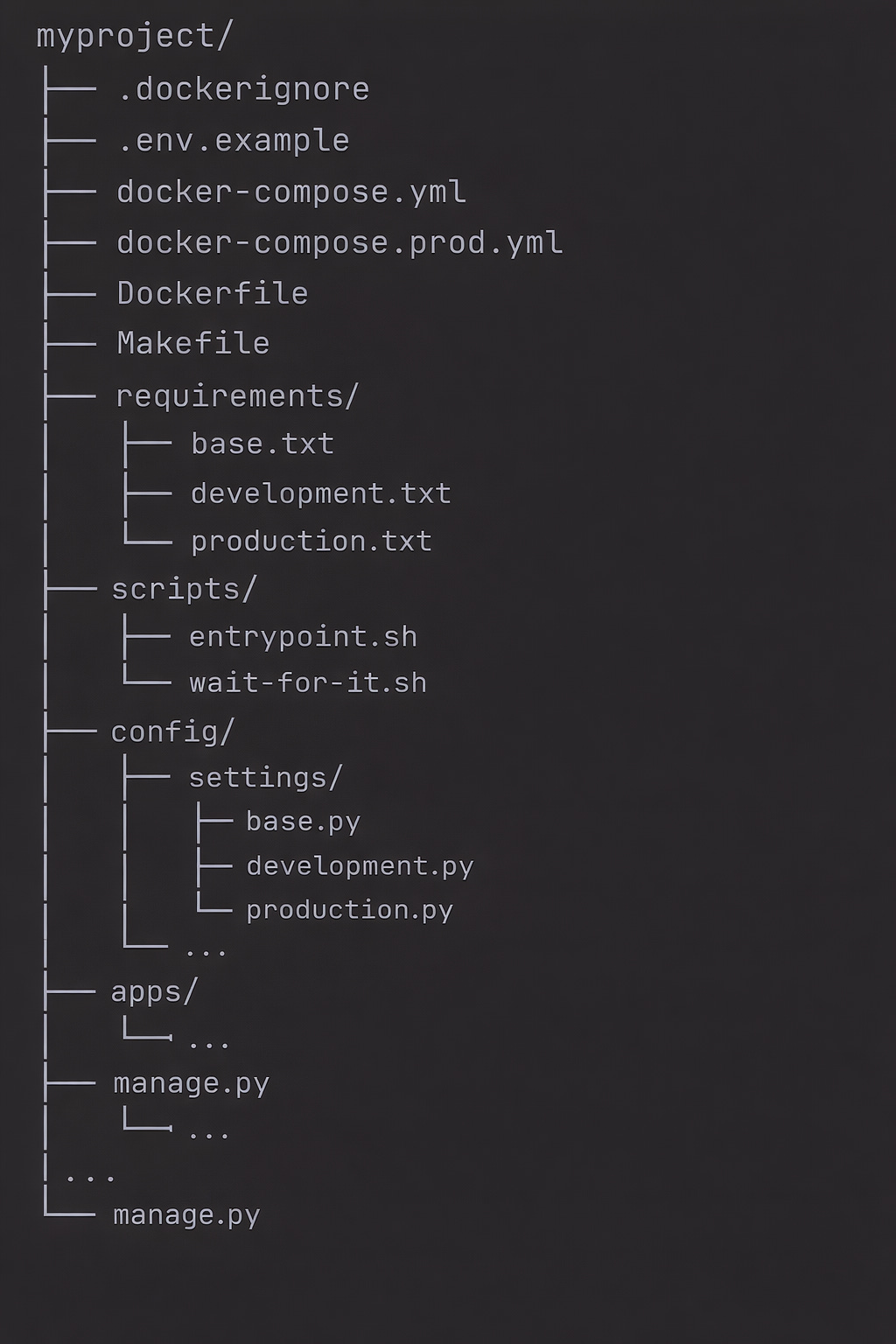
The Dockerfile: Multi-Stage Build
Multi-stage builds keep your final image small by separating build-time dependencies from runtime dependencies.
# Dockerfile

# ============================================
# Stage 1: Build stage
# ============================================
FROM python:3.12-slim as builder

# Set environment variables
ENV PYTHONDONTWRITEBYTECODE=1 \
    PYTHONUNBUFFERED=1 \
    PIP_NO_CACHE_DIR=1 \
    PIP_DISABLE_PIP_VERSION_CHECK=1

# Install build dependencies
RUN apt-get update && apt-get install -y --no-install-recommends \
    build-essential \
    libpq-dev \
    && rm -rf /var/lib/apt/lists/*

# Create virtual environment
RUN python -m venv /opt/venv
ENV PATH=”/opt/venv/bin:$PATH”

# Install Python dependencies
COPY requirements/base.txt requirements/production.txt /tmp/requirements/
RUN pip install --upgrade pip && \
    pip install -r /tmp/requirements/production.txt


# ============================================
# Stage 2: Production stage
# ============================================
FROM python:3.12-slim as production

# Set environment variables
ENV PYTHONDONTWRITEBYTECODE=1 \
    PYTHONUNBUFFERED=1 \
    PYTHONFAULTHANDLER=1 \
    PATH=”/opt/venv/bin:$PATH” \
    APP_HOME=/app

# Install runtime dependencies only
RUN apt-get update && apt-get install -y --no-install-recommends \
    libpq5 \
    curl \
    && rm -rf /var/lib/apt/lists/* \
    && apt-get clean

# Create non-root user
RUN groupadd --gid 1000 appgroup && \
    useradd --uid 1000 --gid appgroup --shell /bin/bash --create-home appuser

# Set work directory
WORKDIR $APP_HOME

# Copy virtual environment from builder
COPY --from=builder /opt/venv /opt/venv

# Copy application code
COPY --chown=appuser:appgroup . .

# Copy and set entrypoint script
COPY --chown=appuser:appgroup scripts/entrypoint.sh /entrypoint.sh
RUN chmod +x /entrypoint.sh

# Create directories for static and media files
RUN mkdir -p staticfiles media && \
    chown -R appuser:appgroup staticfiles media

# Switch to non-root user
USER appuser

# Expose port
EXPOSE 8000

# Health check
HEALTHCHECK --interval=30s --timeout=10s --start-period=5s --retries=3 \
    CMD curl -f http://localhost:8000/health/ || exit 1

# Set entrypoint
ENTRYPOINT [”/entrypoint.sh”]

# Default command
CMD [”gunicorn”, “config.wsgi:application”, “--bind”, “0.0.0.0:8000”, “--workers”, “4”]


# ============================================
# Stage 3: Development stage
# ============================================
FROM production as development

# Switch to root to install dev dependencies
USER root

# Install development dependencies
COPY requirements/development.txt /tmp/requirements/
RUN pip install -r /tmp/requirements/development.txt

# Switch back to non-root user
USER appuser

# Override command for development
CMD [”python”, “manage.py”, “runserver”, “0.0.0.0:8000”]
Key Points
Multi-stage build: Builder stage compiles dependencies, production stage only has runtime needs
Non-root user: Security best practice — never run as root
Virtual environment: Isolated Python packages, easy to copy between stages
Health check: Container orchestrators use this to monitor health
Slim base image:
python:3.12-slimis much smaller thanpython:3.12
The Entrypoint Script
The entrypoint script runs before your application starts — perfect for migrations and setup tasks.
#!/bin/bash
# scripts/entrypoint.sh

set -e

echo “Starting entrypoint script...”

# Wait for database to be ready
if [ -n “$DATABASE_URL” ] || [ -n “$DB_HOST” ]; then
    echo “Waiting for database...”

    # Extract host and port from DATABASE_URL or use DB_HOST/DB_PORT
    if [ -n “$DATABASE_URL” ]; then
        # Parse DATABASE_URL (postgres://user:pass@host:port/dbname)
        DB_HOST=$(echo $DATABASE_URL | sed -e ‘s/.*@\([^:]*\).*/\1/’)
        DB_PORT=$(echo $DATABASE_URL | sed -e ‘s/.*:\([0-9]*\)\/.*/\1/’)
    fi

    DB_HOST=${DB_HOST:-localhost}
    DB_PORT=${DB_PORT:-5432}

    # Wait for database
    while ! nc -z $DB_HOST $DB_PORT; do
        echo “Database not ready, waiting...”
        sleep 1
    done

    echo “Database is ready!”
fi

# Run migrations if AUTO_MIGRATE is set
if [ “$AUTO_MIGRATE” = “true” ]; then
    echo “Running migrations...”
    python manage.py migrate --noinput
fi

# Collect static files if AUTO_COLLECTSTATIC is set
if [ “$AUTO_COLLECTSTATIC” = “true” ]; then
    echo “Collecting static files...”
    python manage.py collectstatic --noinput
fi

# Execute the main command
echo “Starting application...”
exec “$@”
Make it executable:
chmod +x scripts/entrypoint.shThe .dockerignore File
Keep your build context small and secure:
# .dockerignore

# Git
.git
.gitignore

# Docker
Dockerfile*
docker-compose*
.docker

# Python
__pycache__
*.py[cod]
*$py.class
*.so
.Python
.venv
venv/
ENV/
.eggs/
*.egg-info/
*.egg

# Testing
.pytest_cache
.coverage
htmlcov/
.tox

# IDE
.idea/
.vscode/
*.swp
*.swo

# Environment
.env
.env.*
!.env.example

# Local files
*.log
*.sqlite3
db.sqlite3
media/
staticfiles/

# Documentation
docs/
*.md
!README.md

# Misc
.DS_Store
Thumbs.db
*.bak
Docker Compose for Development
# docker-compose.yml
version: ‘3.8’

services:
  db:
    image: postgres:16-alpine
    volumes:
      - postgres_data:/var/lib/postgresql/data
    environment:
      POSTGRES_DB: myapp
      POSTGRES_USER: myapp
      POSTGRES_PASSWORD: devpassword
    ports:
      - “5432:5432”
    healthcheck:
      test: [”CMD-SHELL”, “pg_isready -U myapp”]
      interval: 5s
      timeout: 5s
      retries: 5

  redis:
    image: redis:7-alpine
    ports:
      - “6379:6379”
    volumes:
      - redis_data:/data
    healthcheck:
      test: [”CMD”, “redis-cli”, “ping”]
      interval: 5s
      timeout: 5s
      retries: 5

  web:
    build:
      context: .
      target: development
    volumes:
      - .:/app
      - static_volume:/app/staticfiles
      - media_volume:/app/media
    ports:
      - “8000:8000”
    environment:
      - DJANGO_SETTINGS_MODULE=config.settings.development
      - DATABASE_URL=postgres://myapp:devpassword@db:5432/myapp
      - REDIS_URL=redis://redis:6379/0
      - DEBUG=True
      - SECRET_KEY=dev-secret-key-not-for-production
      - AUTO_MIGRATE=true
    depends_on:
      db:
        condition: service_healthy
      redis:
        condition: service_healthy

  celery:
    build:
      context: .
      target: development
    command: celery -A config worker -l INFO
    volumes:
      - .:/app
    environment:
      - DJANGO_SETTINGS_MODULE=config.settings.development
      - DATABASE_URL=postgres://myapp:devpassword@db:5432/myapp
      - REDIS_URL=redis://redis:6379/0
    depends_on:
      db:
        condition: service_healthy
      redis:
        condition: service_healthy

  celery-beat:
    build:
      context: .
      target: development
    command: celery -A config beat -l INFO
    volumes:
      - .:/app
    environment:
      - DJANGO_SETTINGS_MODULE=config.settings.development
      - DATABASE_URL=postgres://myapp:devpassword@db:5432/myapp
      - REDIS_URL=redis://redis:6379/0
    depends_on:
      - celery

volumes:
  postgres_data:
  redis_data:
  static_volume:
  media_volume:
Start Development Environment
# Build and start all services
docker-compose up --build

# Run in background
docker-compose up -d

# View logs
docker-compose logs -f web

# Run Django commands
docker-compose exec web python manage.py createsuperuser
docker-compose exec web python manage.py shell

# Stop everything
docker-compose down

# Stop and remove volumes (clean slate)
docker-compose down -v
Docker Compose for Production
# docker-compose.prod.yml
version: ‘3.8’

services:
  db:
    image: postgres:16-alpine
    volumes:
      - postgres_data:/var/lib/postgresql/data
    environment:
      POSTGRES_DB: ${DB_NAME}
      POSTGRES_USER: ${DB_USER}
      POSTGRES_PASSWORD: ${DB_PASSWORD}
    restart: unless-stopped
    healthcheck:
      test: [”CMD-SHELL”, “pg_isready -U ${DB_USER}”]
      interval: 10s
      timeout: 5s
      retries: 5
    networks:
      - backend

  redis:
    image: redis:7-alpine
    command: redis-server --appendonly yes --requirepass ${REDIS_PASSWORD}
    volumes:
      - redis_data:/data
    restart: unless-stopped
    healthcheck:
      test: [”CMD”, “redis-cli”, “-a”, “${REDIS_PASSWORD}”, “ping”]
      interval: 10s
      timeout: 5s
      retries: 5
    networks:
      - backend

  web:
    build:
      context: .
      target: production
    environment:
      - DJANGO_SETTINGS_MODULE=config.settings.production
      - DATABASE_URL=postgres://${DB_USER}:${DB_PASSWORD}@db:5432/${DB_NAME}
      - REDIS_URL=redis://:${REDIS_PASSWORD}@redis:6379/0
      - SECRET_KEY=${SECRET_KEY}
      - ALLOWED_HOSTS=${ALLOWED_HOSTS}
      - AUTO_MIGRATE=true
      - AUTO_COLLECTSTATIC=true
    volumes:
      - static_volume:/app/staticfiles
      - media_volume:/app/media
    restart: unless-stopped
    depends_on:
      db:
        condition: service_healthy
      redis:
        condition: service_healthy
    networks:
      - backend
      - frontend
    deploy:
      resources:
        limits:
          cpus: ‘1’
          memory: 1G

  celery:
    build:
      context: .
      target: production
    command: celery -A config worker -l WARNING --concurrency=4
    environment:
      - DJANGO_SETTINGS_MODULE=config.settings.production
      - DATABASE_URL=postgres://${DB_USER}:${DB_PASSWORD}@db:5432/${DB_NAME}
      - REDIS_URL=redis://:${REDIS_PASSWORD}@redis:6379/0
      - SECRET_KEY=${SECRET_KEY}
    restart: unless-stopped
    depends_on:
      db:
        condition: service_healthy
      redis:
        condition: service_healthy
    networks:
      - backend
    deploy:
      resources:
        limits:
          cpus: ‘0.5’
          memory: 512M

  celery-beat:
    build:
      context: .
      target: production
    command: celery -A config beat -l WARNING
    environment:
      - DJANGO_SETTINGS_MODULE=config.settings.production
      - DATABASE_URL=postgres://${DB_USER}:${DB_PASSWORD}@db:5432/${DB_NAME}
      - REDIS_URL=redis://:${REDIS_PASSWORD}@redis:6379/0
      - SECRET_KEY=${SECRET_KEY}
    restart: unless-stopped
    depends_on:
      - celery
    networks:
      - backend

  nginx:
    image: nginx:alpine
    ports:
      - “80:80”
      - “443:443”
    volumes:
      - ./nginx/nginx.conf:/etc/nginx/nginx.conf:ro
      - ./nginx/conf.d:/etc/nginx/conf.d:ro
      - static_volume:/app/staticfiles:ro
      - media_volume:/app/media:ro
      - ./certbot/conf:/etc/letsencrypt:ro
      - ./certbot/www:/var/www/certbot:ro
    depends_on:
      - web
    restart: unless-stopped
    networks:
      - frontend

volumes:
  postgres_data:
  redis_data:
  static_volume:
  media_volume:

networks:
  frontend:
  backend:
Production Environment File
# .env.production (never commit this!)
SECRET_KEY=your-super-secret-production-key
DEBUG=False
ALLOWED_HOSTS=yourdomain.com,www.yourdomain.com

DB_NAME=myapp_production
DB_USER=myapp_prod
DB_PASSWORD=super-secure-db-password

REDIS_PASSWORD=super-secure-redis-password
Nginx Configuration
# nginx/conf.d/default.conf

upstream django {
    server web:8000;
}

server {
    listen 80;
    server_name yourdomain.com www.yourdomain.com;

    # Redirect HTTP to HTTPS
    location / {
        return 301 https://$host$request_uri;
    }

    # Let’s Encrypt challenge
    location /.well-known/acme-challenge/ {
        root /var/www/certbot;
    }
}

server {
    listen 443 ssl http2;
    server_name yourdomain.com www.yourdomain.com;

    # SSL certificates
    ssl_certificate /etc/letsencrypt/live/yourdomain.com/fullchain.pem;
    ssl_certificate_key /etc/letsencrypt/live/yourdomain.com/privkey.pem;

    # SSL settings
    ssl_protocols TLSv1.2 TLSv1.3;
    ssl_ciphers ECDHE-ECDSA-AES128-GCM-SHA256:ECDHE-RSA-AES128-GCM-SHA256;
    ssl_prefer_server_ciphers off;
    ssl_session_cache shared:SSL:10m;

    # Security headers
    add_header X-Frame-Options “SAMEORIGIN” always;
    add_header X-Content-Type-Options “nosniff” always;
    add_header X-XSS-Protection “1; mode=block” always;
    add_header Strict-Transport-Security “max-age=31536000; includeSubDomains” always;

    # Gzip compression
    gzip on;
    gzip_vary on;
    gzip_min_length 1024;
    gzip_types text/plain text/css application/json application/javascript text/xml application/xml;

    # Static files
    location /static/ {
        alias /app/staticfiles/;
        expires 30d;
        add_header Cache-Control “public, immutable”;
    }

    # Media files
    location /media/ {
        alias /app/media/;
        expires 7d;
        add_header Cache-Control “public”;
    }

    # Django application
    location / {
        proxy_pass http://django;
        proxy_set_header Host $host;
        proxy_set_header X-Real-IP $remote_addr;
        proxy_set_header X-Forwarded-For $proxy_add_x_forwarded_for;
        proxy_set_header X-Forwarded-Proto $scheme;
        proxy_redirect off;

        # Timeouts
        proxy_connect_timeout 60s;
        proxy_send_timeout 60s;
        proxy_read_timeout 60s;
    }

    # Health check endpoint
    location /health/ {
        proxy_pass http://django;
        proxy_set_header Host $host;
        access_log off;
    }
}
Health Check Endpoint
# apps/core/views.py
from django.http import JsonResponse
from django.db import connection
from django.core.cache import cache


def health_check(request):
    “”“Health check endpoint for container orchestration.”“”
    health = {
        ‘status’: ‘healthy’,
        ‘database’: ‘ok’,
        ‘cache’: ‘ok’,
    }

    # Check database
    try:
        with connection.cursor() as cursor:
            cursor.execute(’SELECT 1’)
    except Exception as e:
        health[’status’] = ‘unhealthy’
        health[’database’] = str(e)

    # Check cache
    try:
        cache.set(’health_check’, ‘ok’, 1)
        if cache.get(’health_check’) != ‘ok’:
            raise Exception(’Cache read failed’)
    except Exception as e:
        health[’status’] = ‘unhealthy’
        health[’cache’] = str(e)

    status_code = 200 if health[’status’] == ‘healthy’ else 503
    return JsonResponse(health, status=status_code)
# config/urls.py
from apps.core.views import health_check
urlpatterns = [
path(’health/’, health_check, name=’health_check’),
# ...
]Makefile for Common Commands
# Makefile
.PHONY: build up down logs shell migrate test clean

# Development
build:
 docker-compose build

up:
 docker-compose up -d

down:
 docker-compose down

logs:
 docker-compose logs -f

shell:
 docker-compose exec web python manage.py shell

bash:
 docker-compose exec web bash

migrate:
 docker-compose exec web python manage.py migrate

makemigrations:
 docker-compose exec web python manage.py makemigrations

test:
 docker-compose exec web pytest

createsuperuser:
 docker-compose exec web python manage.py createsuperuser

# Production
prod-build:
 docker-compose -f docker-compose.prod.yml build

prod-up:
 docker-compose -f docker-compose.prod.yml up -d

prod-down:
 docker-compose -f docker-compose.prod.yml down

prod-logs:
 docker-compose -f docker-compose.prod.yml logs -f

# Utilities
clean:
 docker-compose down -v --remove-orphans
 docker system prune -f

clean-all:
 docker-compose down -v --remove-orphans
 docker system prune -af --volumes
Environment Variable Handling
Development: Use .env file
# config/settings/development.py
from decouple import config

DEBUG = True
SECRET_KEY = config(’SECRET_KEY’, default=’dev-secret-key’)
Production: Use environment variables
# config/settings/production.py
from decouple import config

DEBUG = False
SECRET_KEY = config(’SECRET_KEY’)  # No default, must be set
ALLOWED_HOSTS = config(’ALLOWED_HOSTS’, cast=lambda v: [s.strip() for s in v.split(’,’)])
Database URL Parsing
# config/settings/base.py
import dj_database_url

# Support both DATABASE_URL and individual settings
DATABASE_URL = config(’DATABASE_URL’, default=None)

if DATABASE_URL:
    DATABASES = {
        ‘default’: dj_database_url.parse(DATABASE_URL, conn_max_age=60)
    }
else:
    DATABASES = {
        ‘default’: {
            ‘ENGINE’: ‘django.db.backends.postgresql’,
            ‘NAME’: config(’DB_NAME’),
            ‘USER’: config(’DB_USER’),
            ‘PASSWORD’: config(’DB_PASSWORD’),
            ‘HOST’: config(’DB_HOST’, default=’localhost’),
            ‘PORT’: config(’DB_PORT’, default=’5432’),
        }
    }
Security Checklist for Docker
Image Security
Use official base images
Pin image versions (not
latest)Run as non-root user
Don’t store secrets in images
Scan images for vulnerabilities
Runtime Security
Read-only filesystem where possible
Drop all capabilities, add only needed ones
Use secrets management (Docker secrets, Vault)
Network segmentation (frontend/backend networks)
Resource limits (CPU, memory)
Build Security
Multi-stage builds (no build tools in final image)
Comprehensive .dockerignore
No secrets in build args
Reproducible builds (pinned dependencies)
Key Takeaways
1. Multi-stage builds are essential — Separate build and runtime for smaller, more secure images.
2. Never run as root — Create a dedicated user for your application.
3. Use health checks — Container orchestrators need to know when your app is ready.
4. Separate development and production configs — Different Compose files, different settings.
5. Handle environment variables properly — .env for development, real environment variables for production.
6. Use .dockerignore — Keep your build context small and secure.
7. Put Nginx in front — Static files, SSL termination, and caching belong in Nginx.
8. Makefile saves time — Common commands should be one word away.
Docker transforms deployment from a manual, error-prone process into a reproducible, automated one. Get the foundation right, and you’ll deploy with confidence.