

FastAPI Background Tasks vs Celery (When to Use Which)
One lives inside your app. The other doesn’t.

A product manager walked up to my desk on a Friday afternoon. Never a good sign.
“Users are complaining the signup endpoint is slow.”
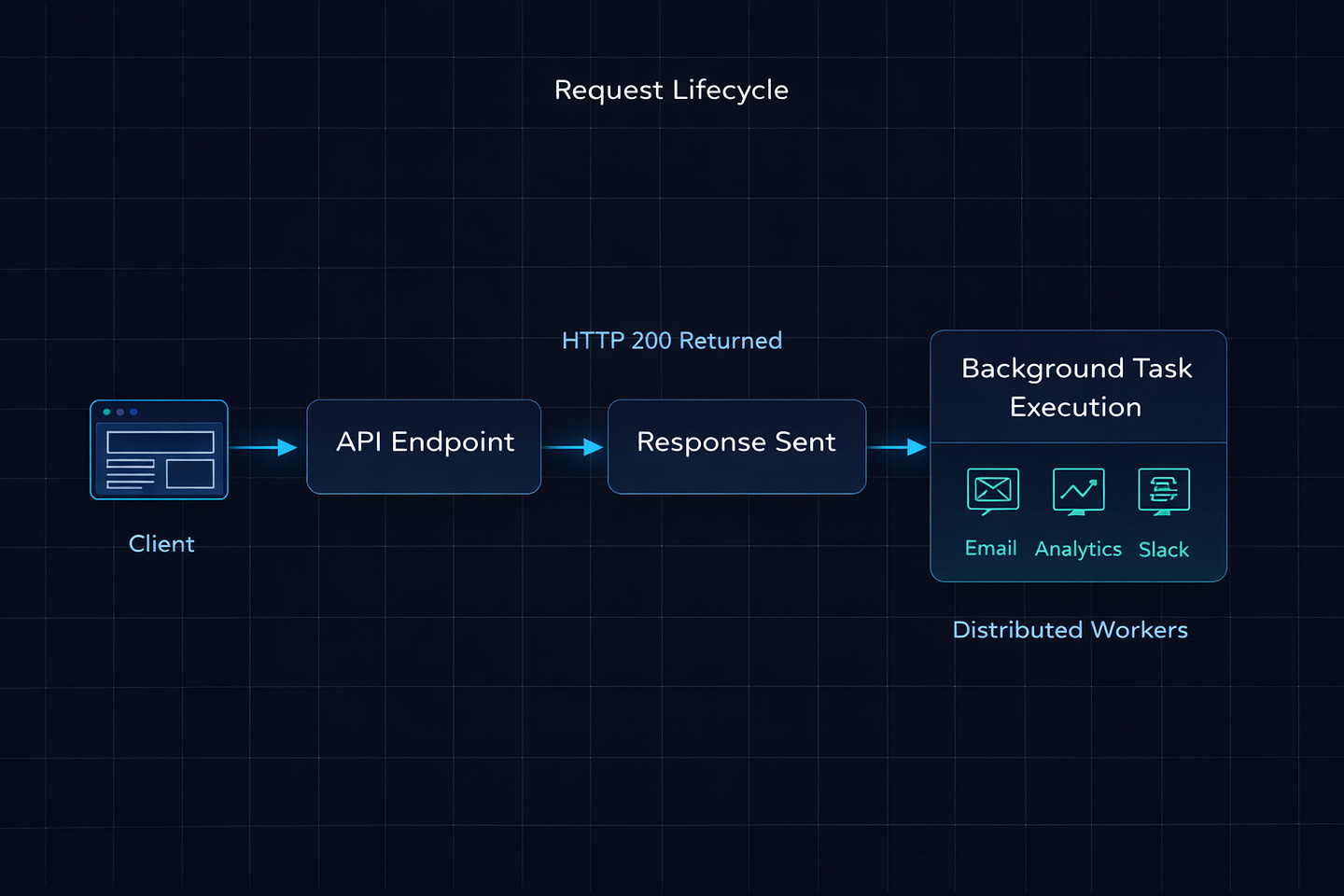
I checked the logs. Signup was taking 4.2 seconds on average. The actual user creation — hashing the password, writing to the database, generating a JWT — took about 180 milliseconds. The other 4 seconds? We were sending a welcome email, creating a default workspace, calling Segment for analytics tracking, and hitting a Slack webhook to notify the sales team. All of it happening synchronously, inside the request, before the user got their response.
My first instinct was Celery. Spin up Redis, configure workers, set up Flower for monitoring, update the Docker Compose file, add health checks. I’d done it a dozen times before.
My tech lead stopped me. “It’s four lightweight HTTP calls. You don’t need a freight train to deliver a letter.”
He was right. I slapped FastAPI’s BackgroundTasks on it. Signup dropped to 200 milliseconds. The user got their response instantly, and the emails and webhooks fired in the background. Done in fifteen minutes.
Six months later, we needed to generate PDF reports from user data. Some of these took 45 seconds. Users could request them in bulk — twenty at a time. BackgroundTasks started choking. Response times across the entire API degraded because those PDF jobs were eating up the event loop.
That’s when we added Celery.
The lesson I took from this: both tools exist for a reason, and the line between them is clearer than most articles make it seem. Let me show you exactly where that line is.
How FastAPI BackgroundTasks Actually Works
Let’s start with what’s really happening when you use BackgroundTasks. Most developers treat it like a black box — “it runs stuff in the background.” But understanding the mechanics tells you exactly when it’ll fail you.
from fastapi import BackgroundTasks, FastAPI

app = FastAPI()


def send_welcome_email(email: str):
    # Simulate an email API call
    requests.post(”https://api.sendgrid.com/v3/mail/send”, json={
        “to”: email,
        “subject”: “Welcome!”,
        “body”: “Thanks for signing up.”
    })


@app.post(”/signup”)
async def signup(email: str, password: str, background_tasks: BackgroundTasks):
    user = create_user(email, password)
    token = generate_jwt(user)

    # This runs AFTER the response is sent
    background_tasks.add_task(send_welcome_email, email)

    return {”token”: token}
Here’s what FastAPI does behind the scenes, step by step:
Your endpoint runs and returns
{"token": token}FastAPI sends the HTTP response to the client
Only then does it execute
send_welcome_email(email)If you added multiple tasks, they run sequentially — one after another, in the order you added them
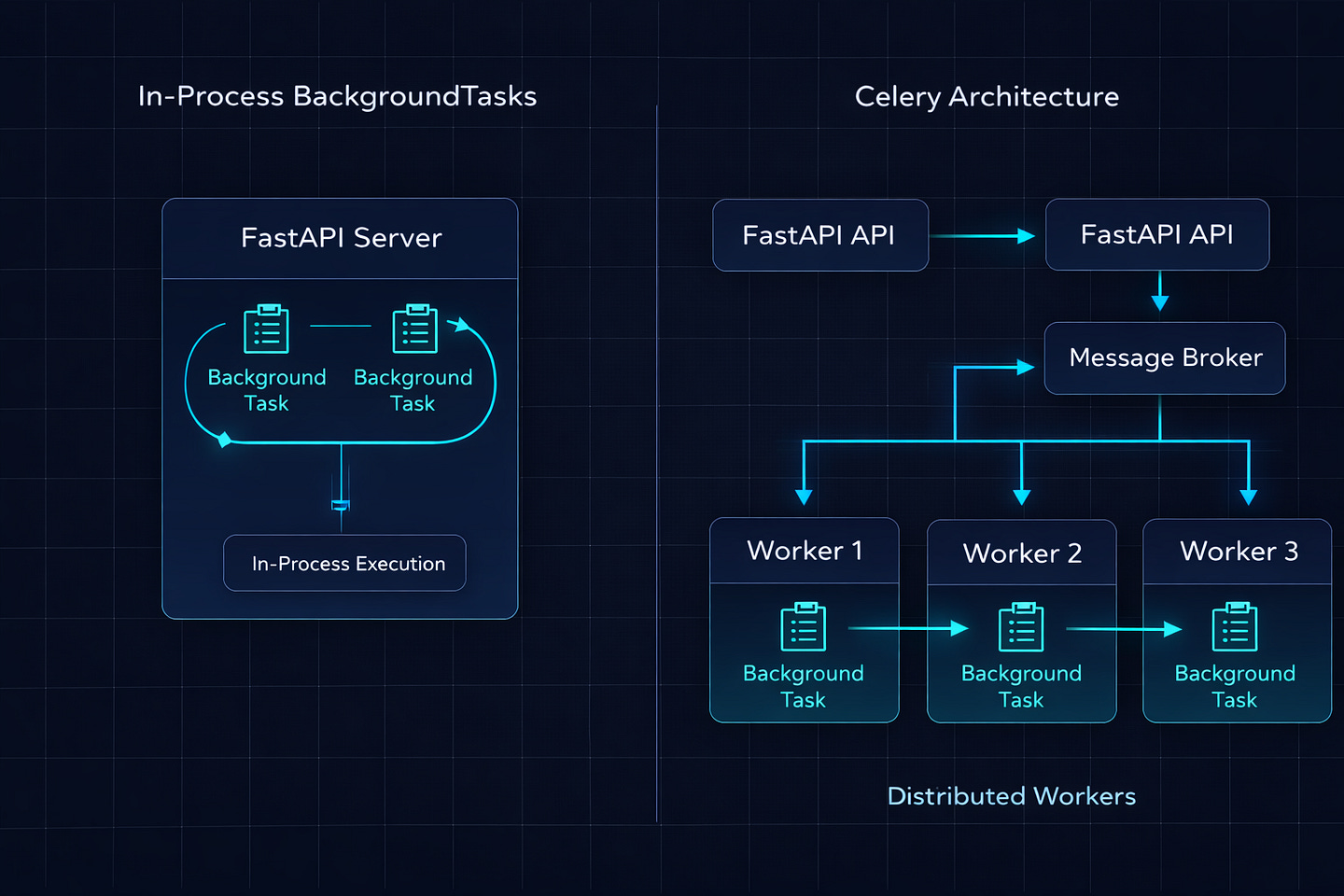
The critical thing: these tasks run in the same process as your FastAPI server. There’s no separate worker. No message queue. No Redis. The task literally executes inside the same Python process that’s serving your API requests.
For a quick email API call that takes 200 milliseconds, this is perfectly fine. The user already got their response. The email fires right after. Nobody notices.
But what happens when that “background” task takes 30 seconds? Or when 50 users trigger background tasks simultaneously?
Where BackgroundTasks Breaks Down
I learned this the painful way, so let me save you the production incident.
Problem 1: CPU-Heavy Tasks Block Everything
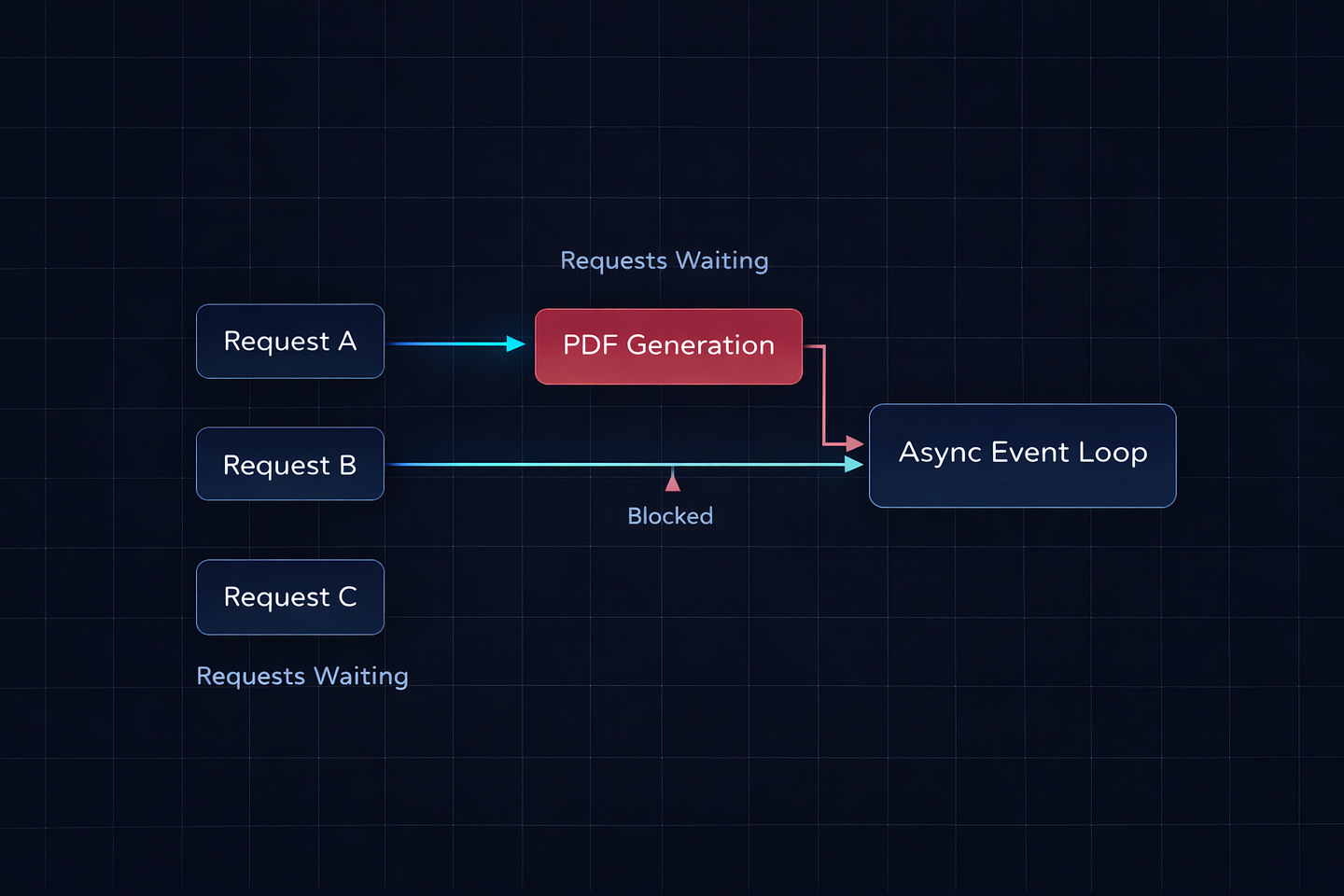
FastAPI runs on a single-threaded event loop (via uvicorn with asyncio). When a background task does CPU-intensive work — like generating a PDF, processing an image, or crunching numbers — it blocks the event loop. While that task runs, your API can’t serve other requests.
# This will destroy your API performance
def generate_pdf_report(user_id: int):
    data = fetch_report_data(user_id)
    # This takes 30 seconds of pure CPU work
    pdf = render_pdf(data)  # Blocks the entire event loop
    save_to_s3(pdf)


@app.post(”/reports”)
async def request_report(user_id: int, background_tasks: BackgroundTasks):
    background_tasks.add_task(generate_pdf_report, user_id)
    return {”status”: “generating”}
While render_pdf is running, every other request to your API is sitting in a queue waiting. If five users request reports at the same time, your entire API freezes for over two minutes. Health checks fail. Load balancers start routing traffic away. Alerts fire.
I’ve seen this exact scenario take down a staging environment. The background task was resizing uploaded images. Worked fine with one user. Fell apart the moment QA tested with ten.
Problem 2: No Retry Logic
If your background task fails — network timeout, API rate limit, temporary database hiccup — it just fails. Silently. There’s no built-in retry. No dead letter queue. No way to know it failed unless you manually wrap everything in try/except and build your own alerting.
def send_welcome_email(email: str):
    try:
        response = requests.post(SENDGRID_URL, json=payload)
        response.raise_for_status()
    except requests.RequestException:
        # Now what? Log it? Retry? How many times?
        # You’re building a task queue from scratch at this point
        logger.error(f”Failed to send welcome email to {email}”)
Compare this with Celery, which gives you automatic retries, exponential backoff, max retry limits, and dead letter queues — all with a decorator:
@celery_app.task(bind=True, max_retries=3, default_retry_delay=60)
def send_welcome_email(self, email: str):
    try:
        response = requests.post(SENDGRID_URL, json=payload)
        response.raise_for_status()
    except requests.RequestException as exc:
        raise self.retry(exc=exc)
Three retries, 60 seconds apart, handled automatically. If it still fails after three attempts, it goes to the dead letter queue where you can inspect and replay it later.
Problem 3: Tasks Die With the Server
If your FastAPI process crashes or restarts while a background task is running, that task vanishes. It’s gone. There’s no persistence. The task lived in memory, and when the process died, the task died with it.
In production, deploys happen. Pods get recycled. OOM kills happen. If you’re using BackgroundTasks for anything that absolutely must complete — like charging a payment, updating an inventory count, or sending a critical notification — you’re gambling that nothing goes wrong between the response and the task finishing.
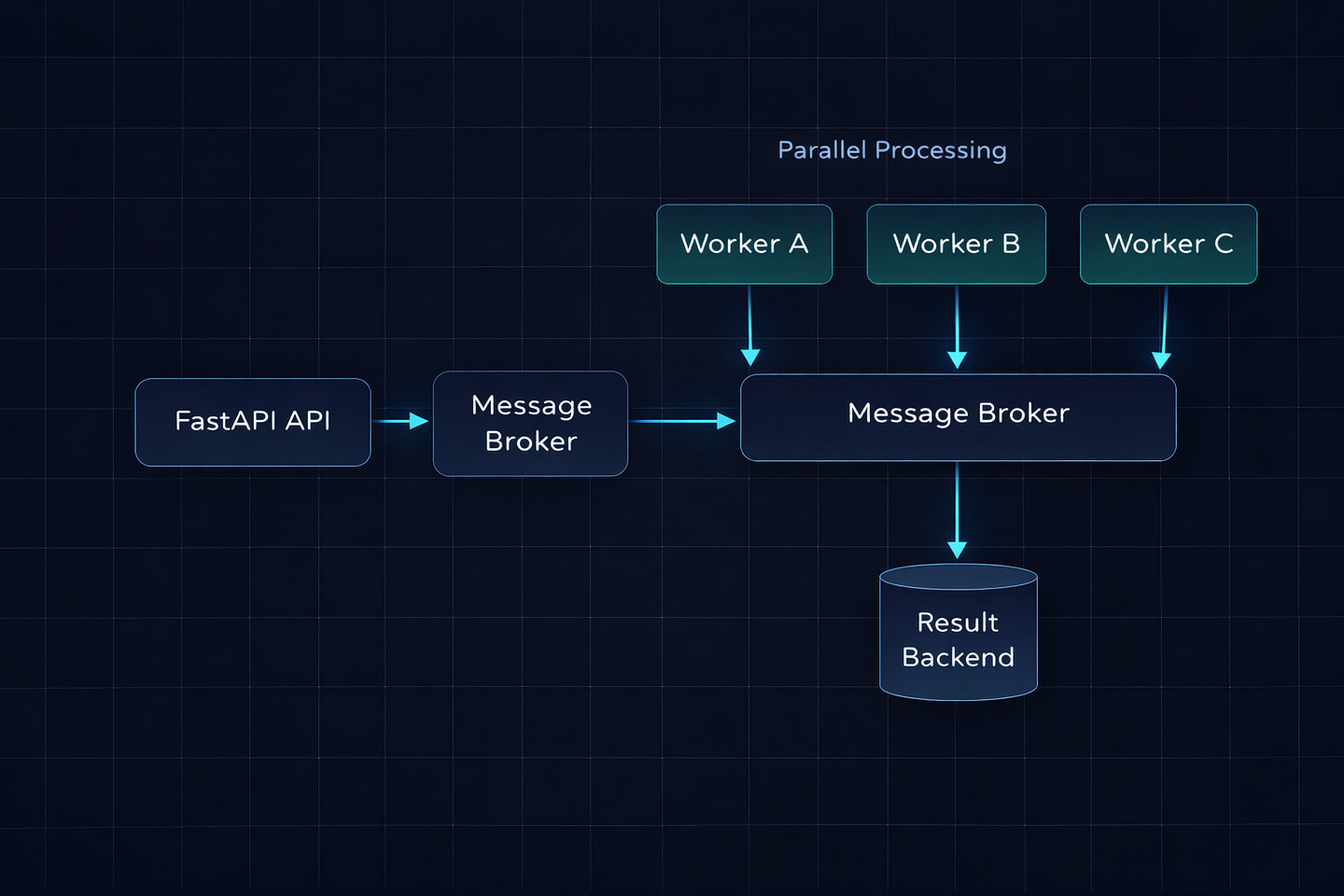
Celery tasks survive server restarts because they’re stored in the message broker (Redis or RabbitMQ). The worker picks them up independently. If a worker crashes, another worker grabs the task. If there are no workers running, the task waits in the queue until one comes back online.
Problem 4: No Visibility
With BackgroundTasks, you have no idea what’s happening. Is the task running? Did it finish? Did it fail? How long did it take? You’d have to build all of that instrumentation yourself.
Celery gives you Flower (a real-time web dashboard), task state tracking (PENDING, STARTED, SUCCESS, FAILURE, RETRY), and integration with monitoring tools like Prometheus and Datadog. In production, this visibility is not optional.
When BackgroundTasks Is the Right Call
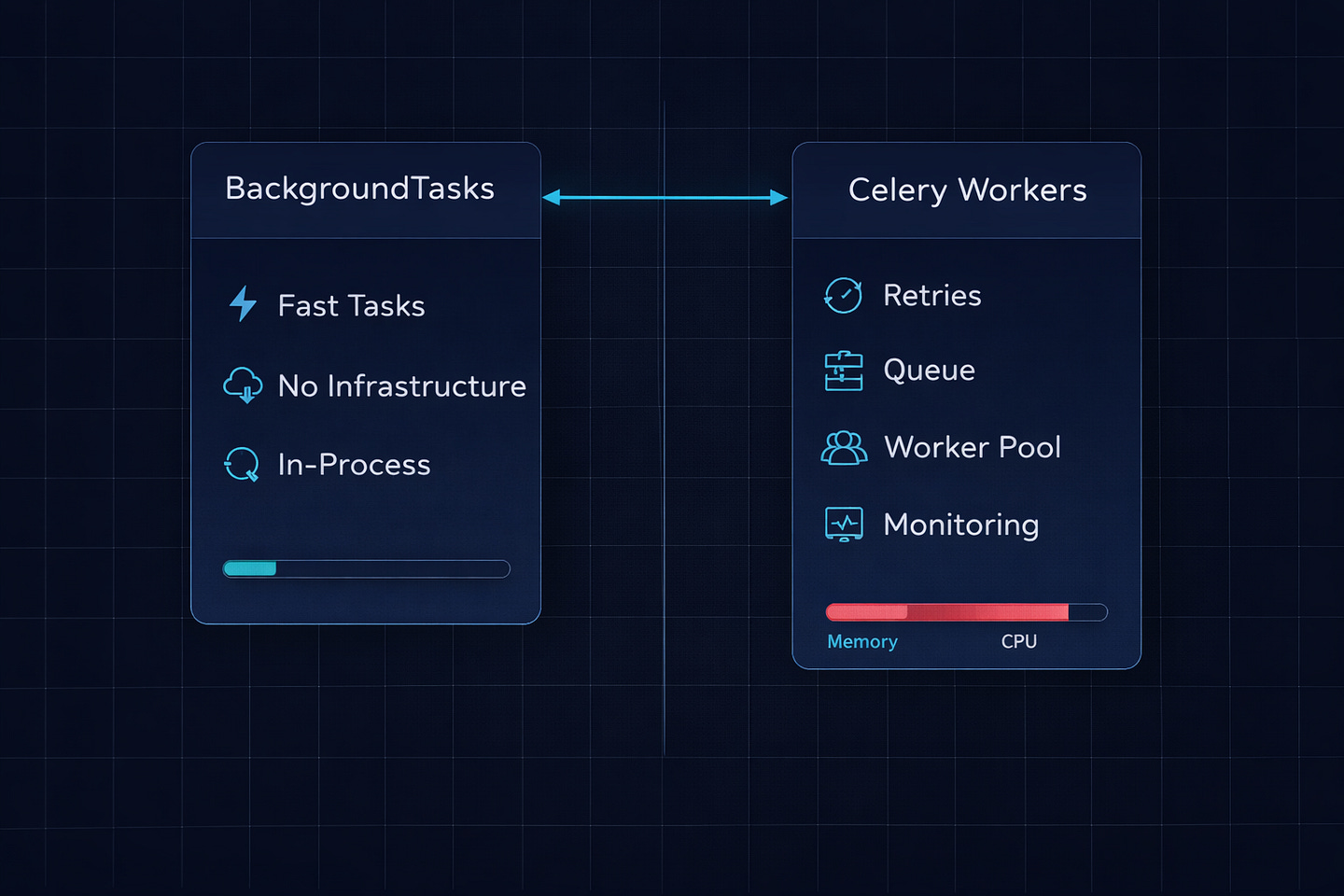
After everything I just said, you might think BackgroundTasks is useless. It’s not. For the right use cases, it’s the best tool because it has zero infrastructure overhead. No Redis. No RabbitMQ. No worker processes. No Docker services to manage. It just works.
Here’s my rule: if the task is fast, fire-and-forget, and non-critical — use BackgroundTasks.
Real examples from production:
# Logging an analytics event — fast, non-critical
background_tasks.add_task(track_event, “user_signed_up”, user.id)

# Sending a Slack notification — fast, non-critical
background_tasks.add_task(notify_slack, f”New signup: {user.email}”)

# Updating a last_login timestamp — fast, non-critical
background_tasks.add_task(update_last_login, user.id)

# Writing to an audit log — fast, non-critical
background_tasks.add_task(write_audit_log, “signup”, user.id, request.client.host)
These are all lightweight I/O operations that take a few hundred milliseconds at most. If one fails, the world doesn’t end. The user’s signup still went through. Nobody’s getting charged incorrectly. The worst case is a missing analytics event or a late Slack message.
You can also chain multiple tasks:
@app.post(”/signup”)
async def signup(email: str, password: str, background_tasks: BackgroundTasks):
    user = create_user(email, password)
    token = generate_jwt(user)

    # All of these fire sequentially after the response
    background_tasks.add_task(send_welcome_email, user.email)
    background_tasks.add_task(track_event, “signup”, user.id)
    background_tasks.add_task(notify_slack_channel, user.email)
    background_tasks.add_task(create_default_workspace, user.id)

    return {”token”: token, “user_id”: user.id}
Four tasks, all lightweight, all running after the user gets their 200ms response. No Redis. No workers. No infrastructure changes. This is exactly the scenario from my Friday afternoon story.
When You Need Celery
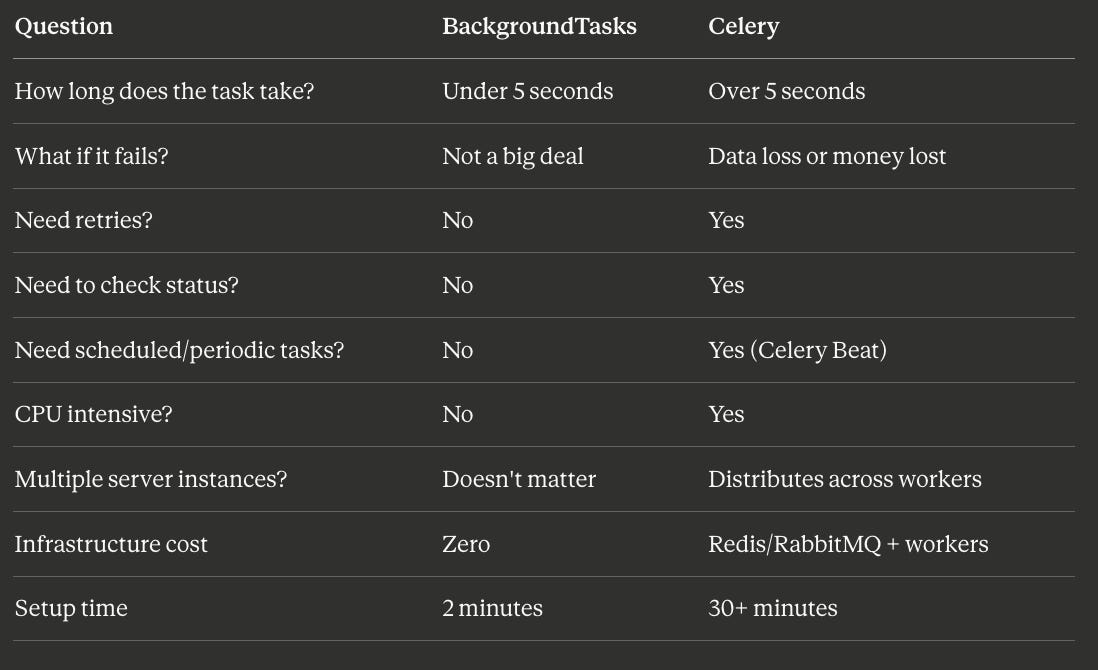
The moment you answer “yes” to any of these, it’s Celery time:
Does the task take more than a few seconds? PDF generation, video processing, image resizing, data aggregation — anything CPU-bound or long-running should be in Celery.
Does the task absolutely have to complete? Payment processing, order fulfillment, inventory updates. If losing the task means losing money or data integrity, you need the persistence and retry guarantees of a message broker.
Do you need to check task status? “Your report is 60% complete” requires a task tracking system. Celery gives you this out of the box with AsyncResult.
Do you need scheduled or periodic tasks? Celery Beat handles cron-like scheduling — daily reports, hourly cleanups, weekly digests.
Are you running multiple server instances? BackgroundTasks runs on whichever server handled the request. Celery distributes tasks across a pool of dedicated workers, independent of your web servers.
Here’s a real Celery setup with FastAPI:
# celery_app.py
from celery import Celery

celery_app = Celery(
    “worker”,
    broker=”redis://localhost:6379/0”,
    backend=”redis://localhost:6379/1”
)

celery_app.conf.update(
    task_serializer=”json”,
    accept_content=[”json”],
    result_serializer=”json”,
    timezone=”UTC”,
    task_track_started=True,
    task_acks_late=True,  # Tasks survive worker crashes
)
# tasks.py
from celery_app import celery_app
import time
@celery_app.task(bind=True, max_retries=3, default_retry_delay=120)
def generate_report(self, user_id: int, report_type: str):
try:
data = fetch_report_data(user_id, report_type)
pdf = render_pdf(data)
url = upload_to_s3(pdf)
notify_user(user_id, url)
return {”status”: “completed”, “url”: url}
except Exception as exc:
raise self.retry(exc=exc)# routes.py
from fastapi import FastAPI
from tasks import generate_report
from celery.result import AsyncResult
app = FastAPI()
@app.post(”/reports”)
def request_report(user_id: int, report_type: str):
task = generate_report.delay(user_id, report_type)
return {”task_id”: task.id, “status”: “queued”}
@app.get(”/reports/{task_id}”)
def get_report_status(task_id: str):
result = AsyncResult(task_id)
if result.ready():
return {”status”: “completed”, “result”: result.get()}
elif result.failed():
return {”status”: “failed”, “error”: str(result.result)}
else:
return {”status”: result.state}The user hits /reports, gets an instant response with a task ID, and can poll /reports/{task_id} to check progress. The actual work happens on a completely separate worker process that has its own resources and doesn’t interfere with your API performance.
The Hybrid Approach (What I Actually Use)
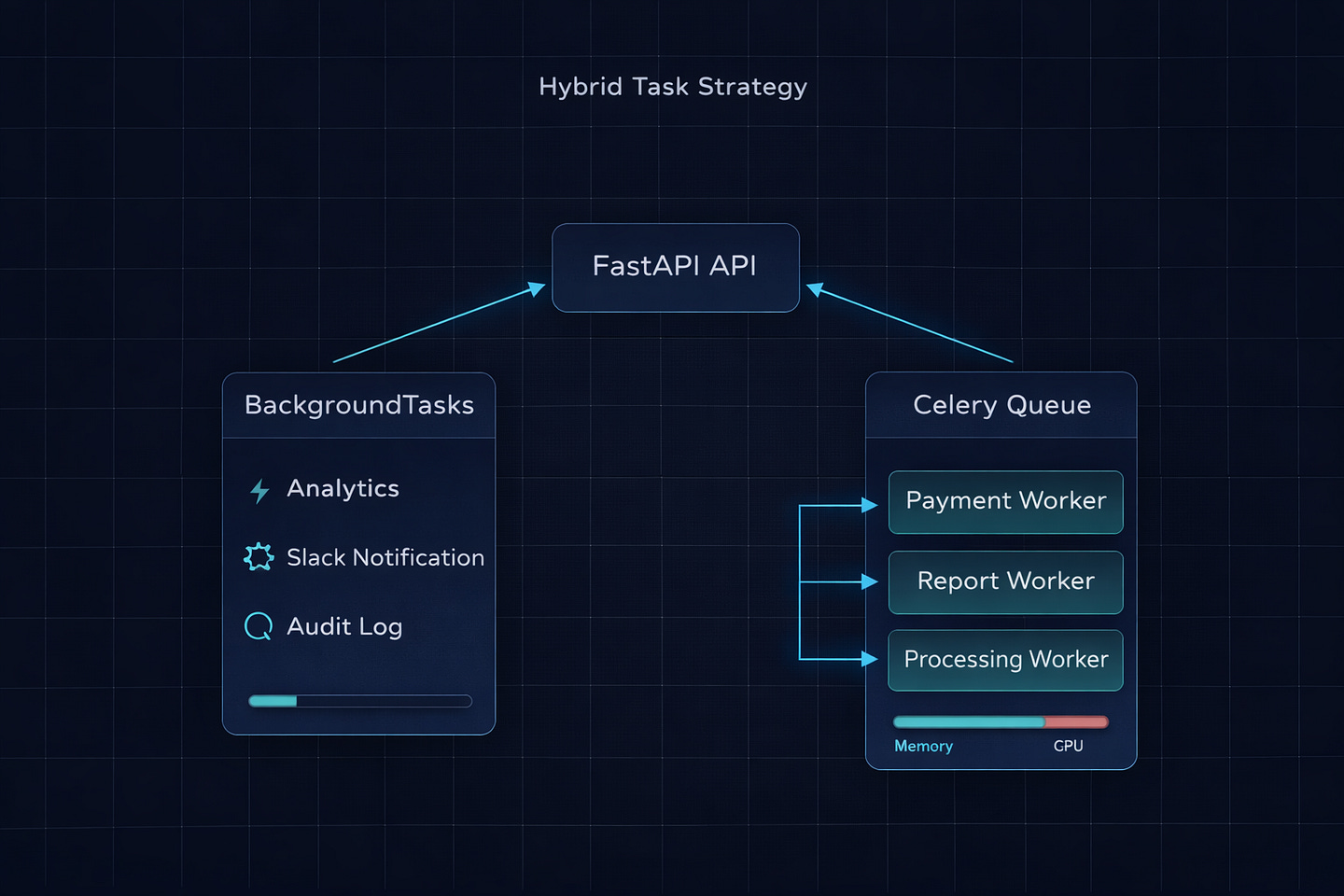
In every production FastAPI project I’ve worked on, we end up using both. Not one or the other. Both. Here’s the pattern:
from fastapi import BackgroundTasks, FastAPI
from tasks import generate_report, process_payment


app = FastAPI()


@app.post(”/orders”)
async def create_order(
    order_data: OrderCreate,
    background_tasks: BackgroundTasks
):
    order = save_order(order_data)

    # Critical — must complete, needs retries → Celery
    process_payment.delay(order.id, order.total)

    # Nice to have, fast, non-critical → BackgroundTasks
    background_tasks.add_task(track_event, “order_created”, order.id)
    background_tasks.add_task(notify_slack, f”New order: ${order.total}”)

    return {”order_id”: order.id, “status”: “processing”}
Payment processing goes to Celery — it has retries, persistence, and separate worker resources. Analytics and Slack notifications use BackgroundTasks — they’re fast, non-critical, and don’t need any infrastructure.
This way, you don’t over-engineer the simple stuff, and you don’t under-engineer the critical stuff.
The Decision Cheat Sheet
The Gotcha That Gets Everyone
One last thing that tripped up our team and I’ve seen trip up at least three other teams since.
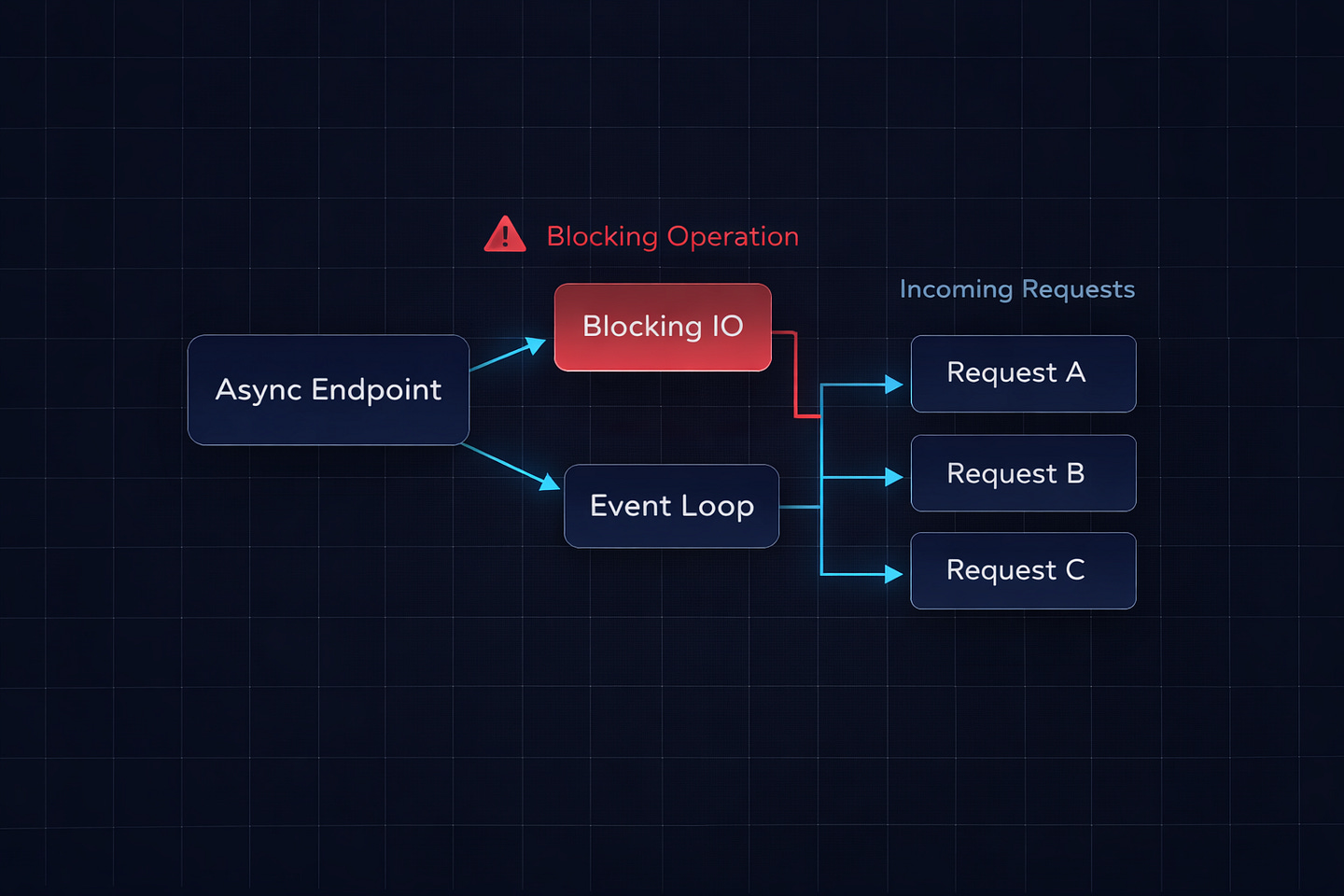
If you declare your FastAPI endpoint with async def and your background task function does blocking I/O (like requests.post or a synchronous database call), that blocking operation will still block the event loop — even though it’s running “in the background.”
# This is dangerous with async endpoints
def send_email(email: str):
    requests.post(SENDGRID_URL, json=payload)  # Blocks the event loop


@app.post(”/signup”)
async def signup(background_tasks: BackgroundTasks):
    background_tasks.add_task(send_email, email)  # Still blocks!
    return {”ok”: True}
The response goes out first, yes. But the blocking requests.post call in the background task still runs on the event loop and blocks other incoming requests while it’s executing.
Two fixes:
# Fix 1: Use httpx with async
import httpx

async def send_email(email: str):
    async with httpx.AsyncClient() as client:
        await client.post(SENDGRID_URL, json=payload)


# Fix 2: Declare the endpoint with plain def
# FastAPI runs it in a thread pool — blocking is safe
@app.post(”/signup”)
def signup(background_tasks: BackgroundTasks):
    background_tasks.add_task(send_email, email)
    return {”ok”: True}
This is the same async def vs def trap from the FastAPI docs, but it bites harder with background tasks because you don’t notice the blocking — it happens after the response. Your endpoint feels fast, but your overall API throughput drops mysteriously under load. We spent two days tracking this down before someone spotted it.
Bottom Line
Start with BackgroundTasks. It costs nothing and handles 80% of real-world background work — logging, notifications, analytics, lightweight API calls. No Redis. No workers. No config files.
When you hit the wall — tasks that take too long, tasks that must complete, tasks that need monitoring or retries — bring in Celery. But bring it in for the specific tasks that need it, not for everything. The hybrid approach gives you simplicity where you can afford it and reliability where you can’t.
The most over-engineered FastAPI project I ever reviewed had Celery handling Slack notifications. The most under-engineered one had BackgroundTasks processing credit card payments. Both were wrong. The line between them isn’t complicated. If it’s fast and disposable, keep it in-process. If it’s slow or irreplaceable, send it to a worker.
What’s the weirdest thing you’ve seen someone put in a BackgroundTask? Or the most overkill Celery setup for a simple job? I’ve seen both extremes — drop yours in the comments.
What’s Next?
If you found this valuable, I’d appreciate your help. Hit the like ♥️ to help others discover this article. Share it with engineers who need to understand distributed systems.
Subscribe if you want more backend engineering deep dives like this delivered to your inbox. I write about Django, Python, databases, and system design—the real stuff we deal with in production.
Your 10 minutes reading this means a lot. Let’s build smarter systems together.