
FastAPI Request Validation: 10 Pydantic Tricks Most Tutorials Skip
Your API is only as safe as your validation layer.

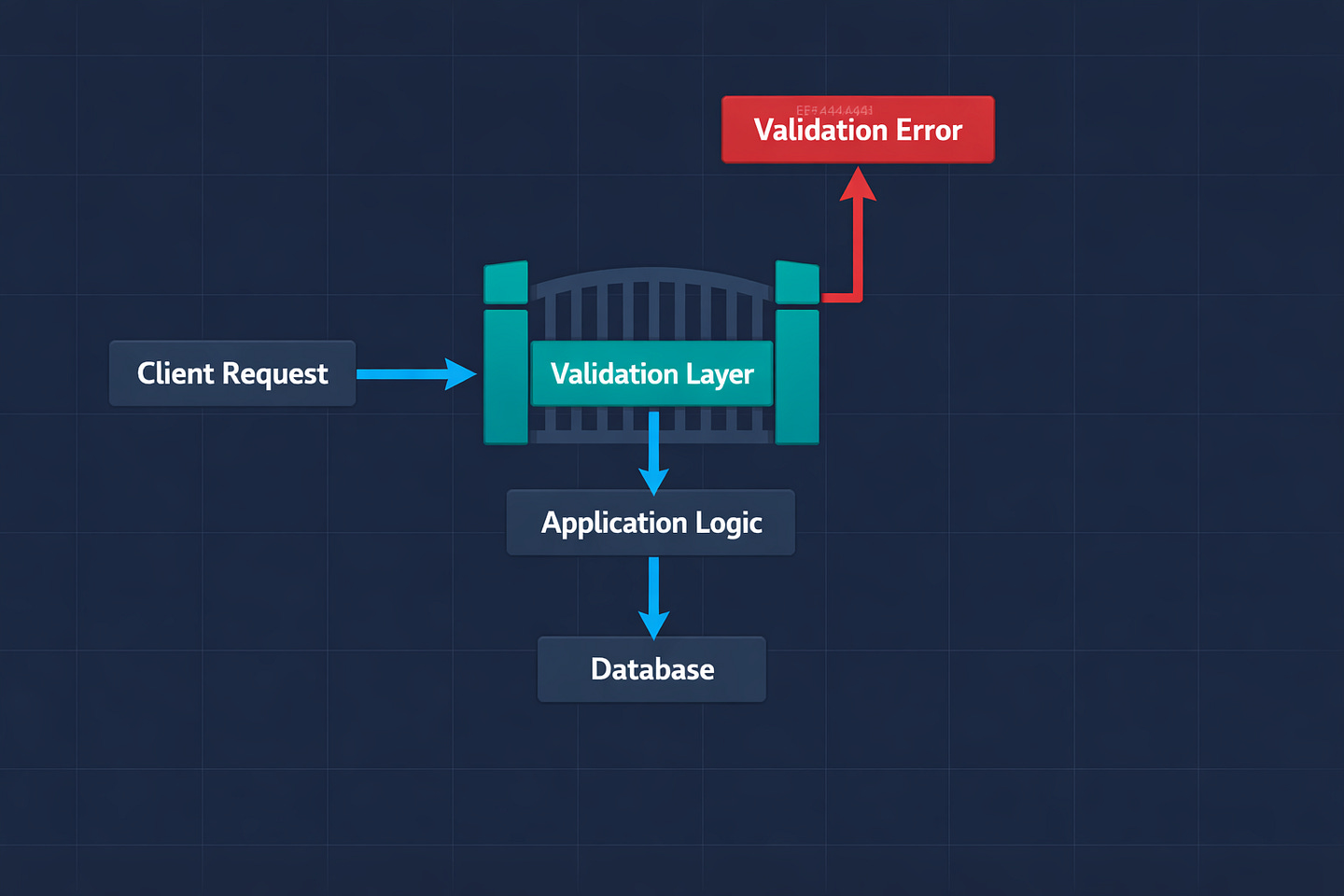
We had an endpoint that accepted a JSON body with a price field. Type-hinted as float. Standard Pydantic model. Worked perfectly for months.
Then one day a frontend developer sent "price": "29.99" — a string, not a number. And Pydantic accepted it. Silently converted it to 29.99 and carried on. No error. No warning. The request went through.
That’s not a bug. That’s Pydantic’s default behavior. It coerces types. A string that looks like a number becomes a number. A string "true" becomes a boolean True. An integer 1 becomes a float 1.0. It’s designed to be forgiving.
And for a lot of APIs, that’s fine. But for our payment endpoint, silently accepting strings where numbers should be was a ticking time bomb. We needed strict validation — and that was the day I learned that most Pydantic tutorials only scratch the surface of what’s possible.
Here are the 10 patterns I’ve collected from building production APIs with FastAPI and Pydantic V2. These are the tricks I wish someone had shown me on day one.
1. Stop Silent Type Coercion with Strict Mode
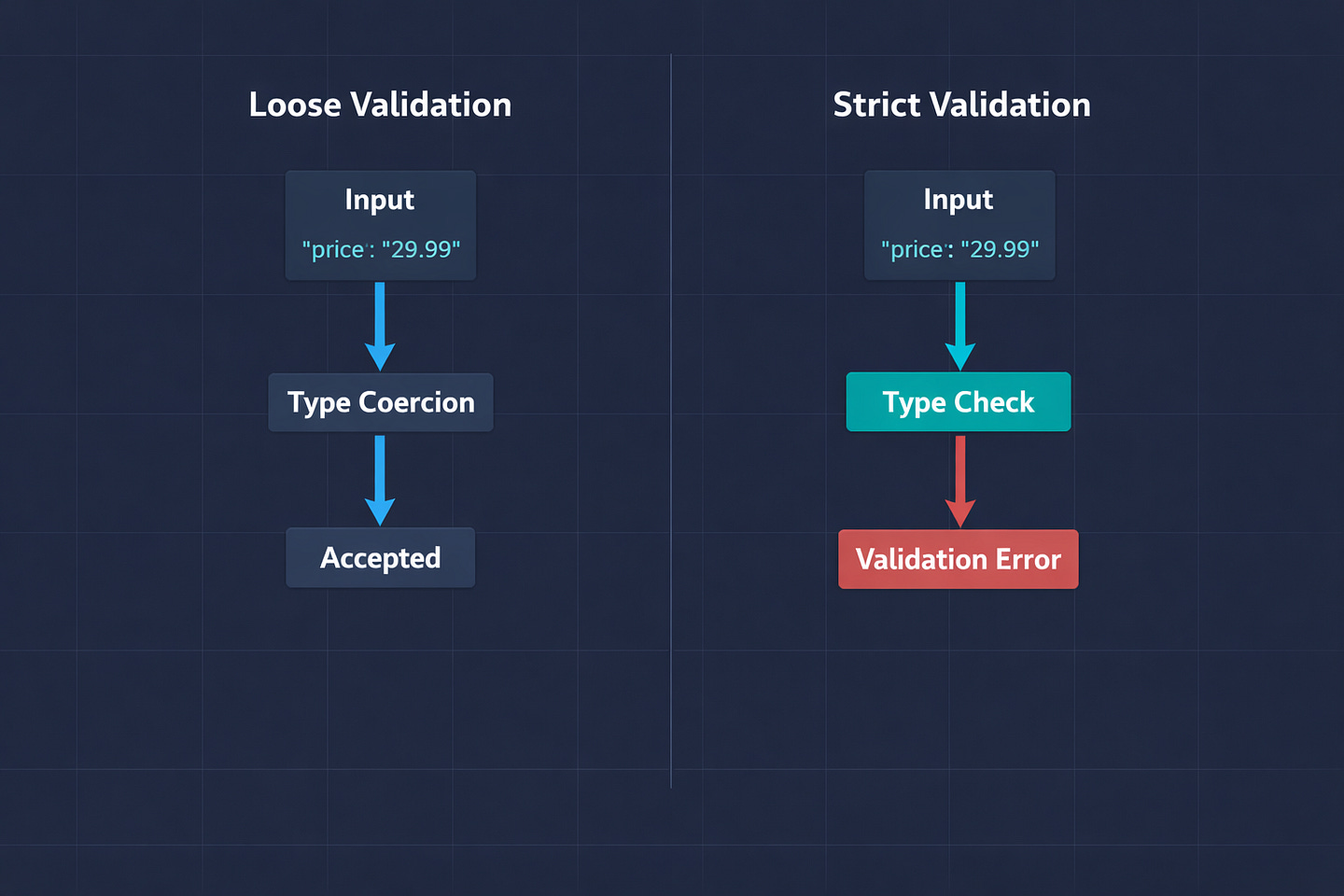
By default, Pydantic will bend over backwards to make your data fit. Send an integer where a string is expected? It’ll convert it. Send a string where a float is expected? It’ll parse it. This is helpful for quick prototyping but dangerous in production.
from pydantic import BaseModel, ConfigDict


# Default behavior — coerces types
class PaymentLoose(BaseModel):
    amount: float
    currency: str

PaymentLoose(amount=”29.99”, currency=123)
# Works! amount=29.99, currency=”123”
# That’s probably not what you wanted


# Strict mode — rejects mismatched types
class PaymentStrict(BaseModel):
    model_config = ConfigDict(strict=True)

    amount: float
    currency: str

PaymentStrict(amount=”29.99”, currency=”USD”)
# ValidationError: amount - Input should be a valid number
ConfigDict(strict=True) on the model level forces Pydantic to reject any input that doesn’t match the exact type. No coercion. No guessing. If the frontend sends a string where a number should be, they get a clear validation error instead of silent acceptance.
You can also apply strictness to individual fields if you don’t want it everywhere:
from pydantic import BaseModel, StrictInt, StrictStr


class Order(BaseModel):
    quantity: StrictInt      # Must be an actual integer
    product_name: StrictStr  # Must be an actual string
    notes: str | None = None # This one can still coerce
I use strict mode on every model that handles money, quantities, or anything where type confusion could lead to data corruption.
2. Field Constraints That Replace Custom Validation
Before you write a custom validator, check if Field() already does what you need. Most tutorials jump straight to @field_validator when the built-in constraints are enough:
from pydantic import BaseModel, Field


class CreateUser(BaseModel):
    username: str = Field(
        min_length=3,
        max_length=30,
        pattern=r’^[a-zA-Z0-9_]+$’  # alphanumeric and underscores only
    )
    email: str = Field(
        max_length=255,

    )
    age: int = Field(ge=13, le=120)
    bio: str | None = Field(default=None, max_length=500)
    referral_code: str | None = Field(default=None, min_length=8, max_length=8)
The pattern parameter is incredibly powerful. Instead of writing a validator that checks if a username contains only valid characters, a single regex does the job. ge (greater than or equal), le (less than or equal), gt, and lt handle all numeric range validation.
The real win here is that these constraints automatically show up in your OpenAPI documentation. Your Swagger UI will display the min/max lengths, the pattern, and the number ranges. Custom validators don’t give you that for free.
3. Separate Models for Create, Update, and Response
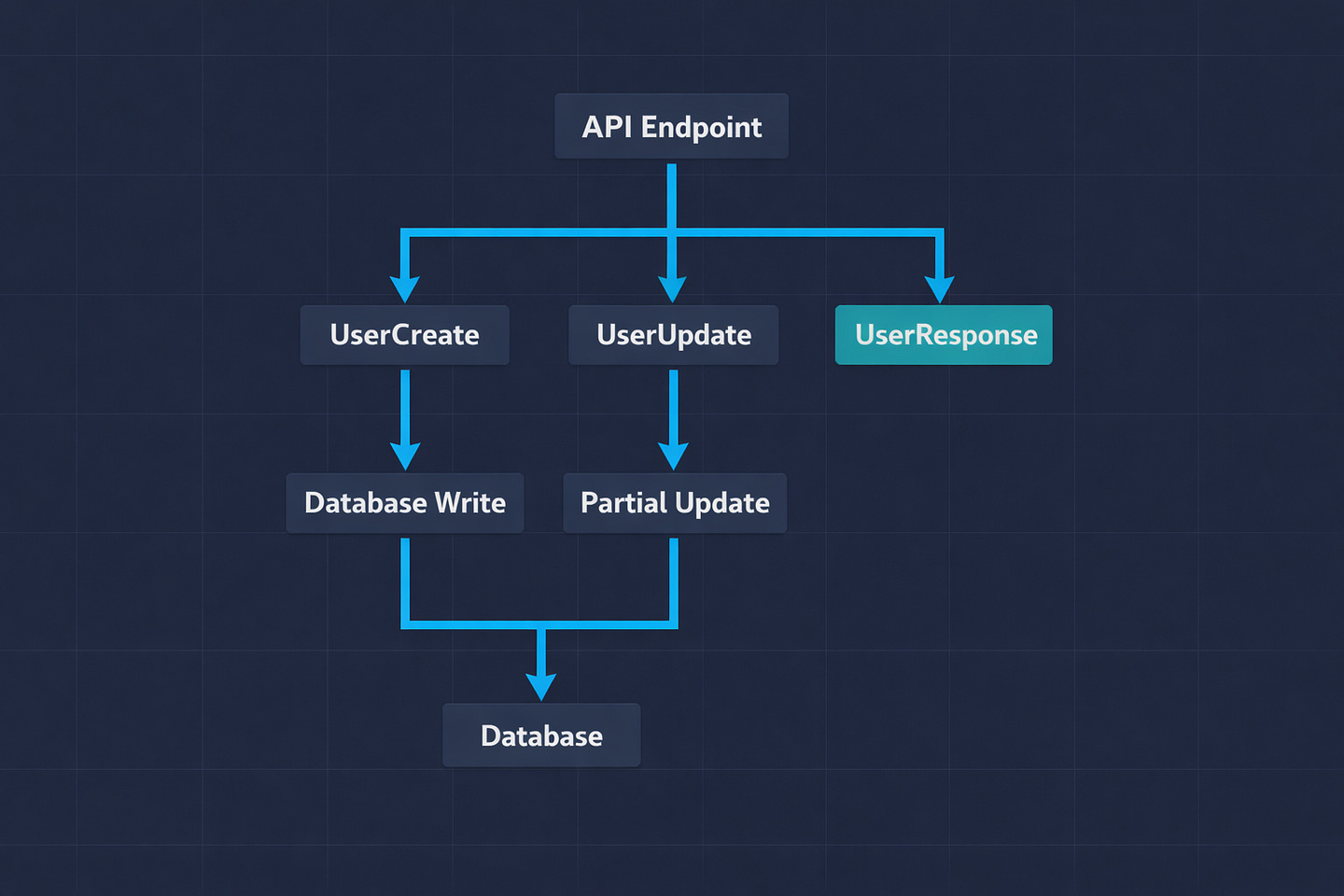
This is the pattern that cleaned up our codebase the most. Instead of one model that tries to handle everything, use separate models for each operation:
from pydantic import BaseModel, Field, EmailStr
from datetime import datetime


# What the client sends to create a user
class UserCreate(BaseModel):
    username: str = Field(min_length=3, max_length=30)
    email: EmailStr
    password: str = Field(min_length=8)


# What the client sends to update a user
class UserUpdate(BaseModel):
    username: str | None = Field(default=None, min_length=3, max_length=30)
    email: EmailStr | None = None
    bio: str | None = Field(default=None, max_length=500)
    # Note: no password field — updates go through a separate endpoint


# What the API sends back
class UserResponse(BaseModel):
    id: int
    username: str
    email: str
    bio: str | None
    created_at: datetime
    # Note: no password field — never expose this

    model_config = ConfigDict(from_attributes=True)
Then in your endpoints:
@app.post(”/users”, response_model=UserResponse)
def create_user(data: UserCreate, db: Session = Depends(get_db)):
    user = User(**data.model_dump())
    user.password = hash_password(data.password)
    db.add(user)
    db.commit()
    return user


@app.patch(”/users/{user_id}”, response_model=UserResponse)
def update_user(user_id: int, data: UserUpdate, db: Session = Depends(get_db)):
    user = db.query(User).get(user_id)
    update_data = data.model_dump(exclude_unset=True)
    for key, value in update_data.items():
        setattr(user, key, value)
    db.commit()
    return user
The key trick in the update endpoint: model_dump(exclude_unset=True). This returns only the fields the client actually sent. If they only sent {"bio": "New bio"}, only bio gets updated. The username and email stay untouched. Without exclude_unset, fields the client didn’t send would be set to None, which is definitely not what you want.
The from_attributes = True config on the response model tells Pydantic it can read data from ORM objects (like SQLAlchemy model instances), not just dictionaries. Without this, returning a SQLAlchemy object directly would fail.
4. Cross-Field Validation with model_validator
Sometimes a single field is valid on its own, but the combination of fields doesn’t make sense. This is where @model_validator comes in — the most underused Pydantic feature I know:
from pydantic import BaseModel, model_validator


class DateRange(BaseModel):
    start_date: date
    end_date: date

    @model_validator(mode=’after’)
    def validate_date_range(self):
        if self.end_date <= self.start_date:
            raise ValueError(’end_date must be after start_date’)
        if (self.end_date - self.start_date).days > 365:
            raise ValueError(’Date range cannot exceed 365 days’)
        return self


class DiscountRule(BaseModel):
    discount_type: str  # “percentage” or “fixed”
    discount_value: float

    @model_validator(mode=’after’)
    def validate_discount(self):
        if self.discount_type == “percentage” and not (0 < self.discount_value <= 100):
            raise ValueError(’Percentage discount must be between 0 and 100’)
        if self.discount_type == “fixed” and self.discount_value <= 0:
            raise ValueError(’Fixed discount must be positive’)
        return self
mode='after' means the validator runs after all individual field validations pass. You get a fully constructed model instance and can check relationships between fields.
There’s also mode='before', which runs before field validation — useful when you need to transform the raw input data:
class FlexibleUserInput(BaseModel):
    name: str
    email: str

    @model_validator(mode=’before’)
    @classmethod
    def normalize_input(cls, data):
        if isinstance(data, dict):
            # Strip whitespace from all string fields
            for key, value in data.items():
                if isinstance(value, str):
                    data[key] = value.strip()
            # Lowercase the email before field validation
            if ‘email’ in data and isinstance(data[’email’], str):
                data[’email’] = data[’email’].lower()
        return data
Now every string field arrives trimmed, and emails are always lowercase — before any validation runs. You’d be surprised how many bugs come from leading spaces or mixed-case emails.
5. Custom Error Messages That Actually Help
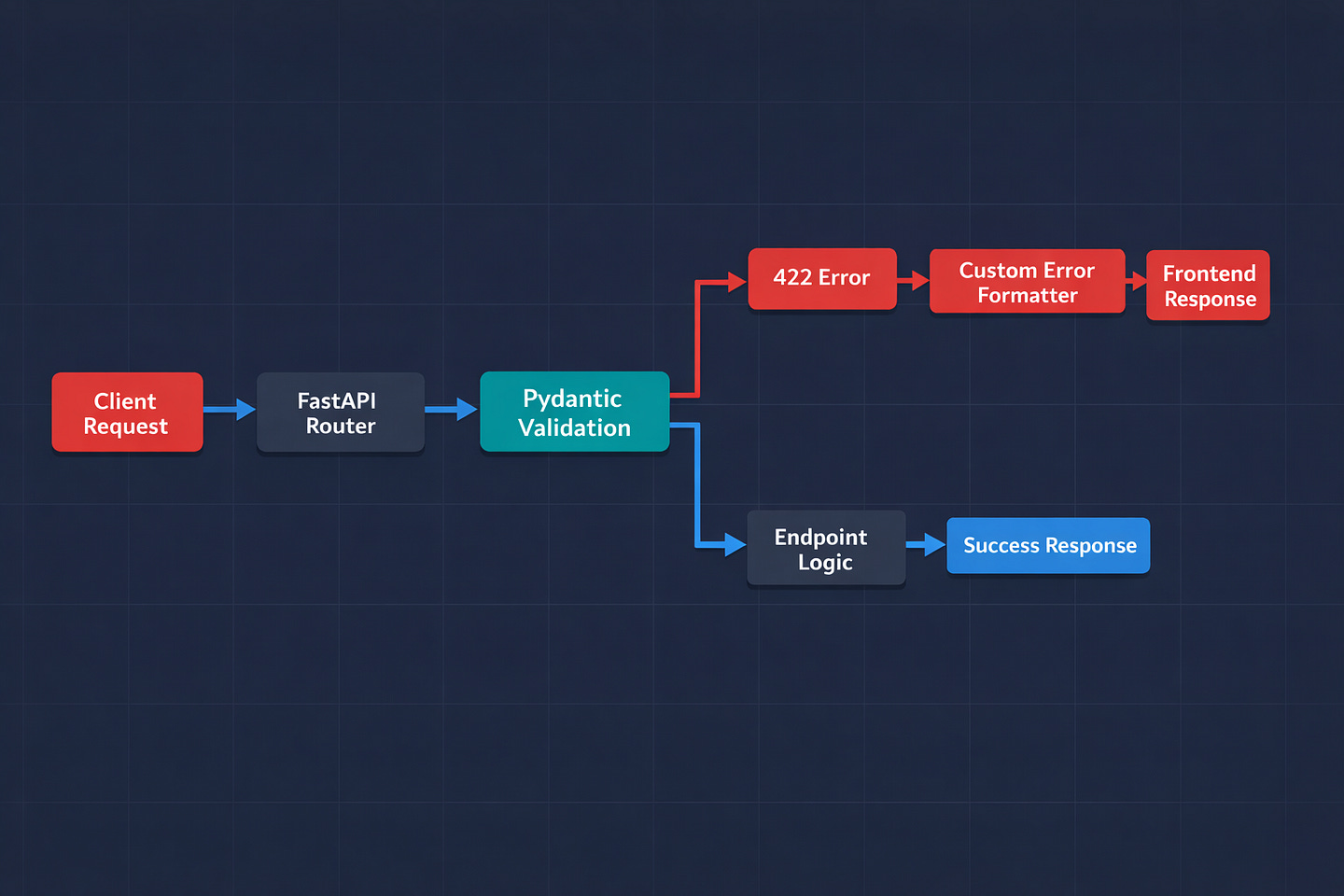
FastAPI’s default 422 error responses are technically correct but practically useless to frontend developers. They look like this:
{
    “detail”: [
        {
            “type”: “string_too_short”,
            “loc”: [”body”, “password”],
            “msg”: “String should have at least 8 characters”,
            “input”: “abc”
        }
    ]
}
The structure is fine for machines, but your frontend team probably wants something friendlier. Here’s how I override the validation error handler:
from fastapi import FastAPI, Request
from fastapi.exceptions import RequestValidationError
from fastapi.responses import JSONResponse


app = FastAPI()


@app.exception_handler(RequestValidationError)
async def custom_validation_handler(request: Request, exc: RequestValidationError):
    errors = {}
    for error in exc.errors():
        # Get the field name from the location tuple
        field = error[’loc’][-1] if error[’loc’] else ‘unknown’
        # Use a human-readable message
        errors[field] = error[’msg’]

    return JSONResponse(
        status_code=422,
        content={
            “success”: False,
            “message”: “Validation failed”,
            “errors”: errors
        }
    )
Now the response looks like:
{
    “success”: false,
    “message”: “Validation failed”,
    “errors”: {
        “password”: “String should have at least 8 characters”,
        “email”: “value is not a valid email address”
    }
}
Clean, predictable, and easy for the frontend to map to form fields. I’ve had frontend developers literally thank me for this pattern. It saves them from parsing nested arrays just to show an error message next to an input field.
6. Reusable Field Types for Common Patterns
If you’re validating phone numbers, slugs, or currency codes in multiple models, stop repeating yourself. Create custom annotated types once and reuse them everywhere:
from typing import Annotated
from pydantic import Field, AfterValidator


def validate_phone(value: str) -> str:
    cleaned = ‘’.join(c for c in value if c.isdigit() or c == ‘+’)
    if not (10 <= len(cleaned) <= 15):
        raise ValueError(’Phone number must be 10-15 digits’)
    return cleaned


def validate_slug(value: str) -> str:
    import re
    if not re.match(r’^[a-z0-9]+(?:-[a-z0-9]+)*$’, value):
        raise ValueError(’Slug must be lowercase alphanumeric with hyphens’)
    return value


def validate_currency_code(value: str) -> str:
    valid_currencies = {’USD’, ‘EUR’, ‘GBP’, ‘JPY’, ‘AUD’, ‘CAD’, ‘LKR’}
    upper = value.upper()
    if upper not in valid_currencies:
        raise ValueError(f’Currency must be one of: {”, “.join(sorted(valid_currencies))}’)
    return upper


# Define reusable types
PhoneNumber = Annotated[str, AfterValidator(validate_phone)]
Slug = Annotated[str, Field(min_length=1, max_length=100), AfterValidator(validate_slug)]
CurrencyCode = Annotated[str, AfterValidator(validate_currency_code)]


# Use them across your entire project
class UserProfile(BaseModel):
    phone: PhoneNumber
    website_slug: Slug


class Payment(BaseModel):
    amount: float = Field(gt=0)
    currency: CurrencyCode


class Merchant(BaseModel):
    support_phone: PhoneNumber
    default_currency: CurrencyCode
store_slug: SlugPhoneNumber, Slug, and CurrencyCode are now reusable types. When the validation logic changes — say you add a new supported currency — you change it in one place and every model that uses CurrencyCode gets the update. This is cleaner than copying validators across ten different models.
7. Forbid Extra Fields (Stop Accepting Junk)
By default, Pydantic silently ignores fields it doesn’t recognize. If your model expects name and email, and someone sends name, email, and is_admin: true — Pydantic happily discards is_admin without telling anyone.
That’s a security risk. A malicious client could probe your API by sending extra fields, hoping one gets through during a code change.
from pydantic import BaseModel, ConfigDict


class SecureUserCreate(BaseModel):
    model_config = ConfigDict(extra=’forbid’)

    username: str
    email: str
    password: str

# This now raises a validation error
SecureUserCreate(username=”alice”, email=”a@b.com”, password=”12345678”, is_admin=True)
# ValidationError: Extra inputs are not permitted
extra='forbid' rejects any field that isn’t explicitly defined in the model. I use this on every model that handles sensitive operations — user creation, payment processing, role assignment. It’s one line of config that closes an entire class of potential issues.
8. Nested Models for Complex JSON
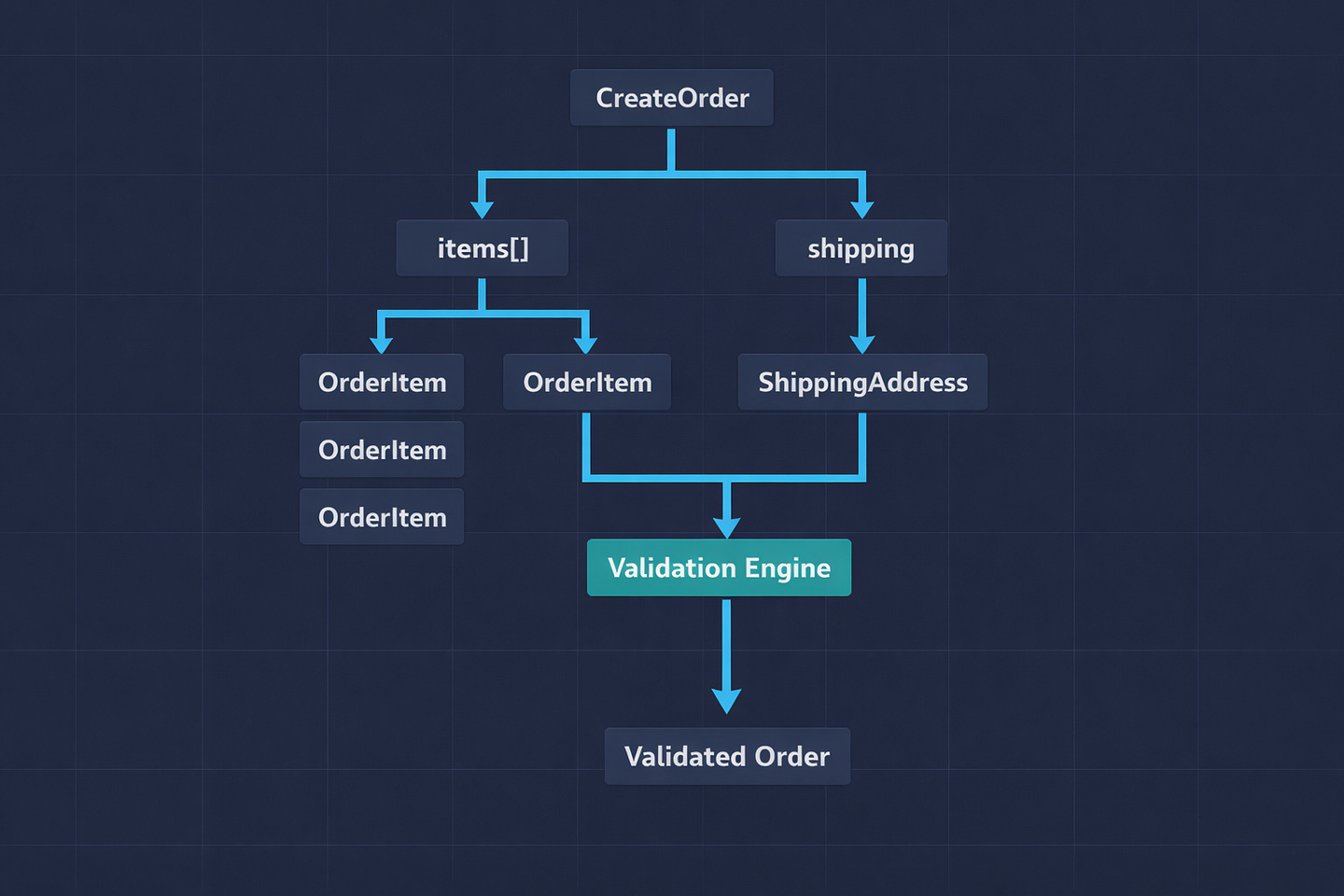
Real APIs deal with nested data. An order has items. A user has addresses. Don’t flatten everything into a single model — nest them:
from pydantic import BaseModel, Field


class OrderItem(BaseModel):
    product_id: int
    quantity: int = Field(gt=0, le=100)
    unit_price: float = Field(gt=0)


class ShippingAddress(BaseModel):
    street: str = Field(min_length=5)
    city: str
    postal_code: str = Field(pattern=r’^\d{5}(-\d{4})?$’)
    country: str = Field(min_length=2, max_length=2)


class CreateOrder(BaseModel):
    model_config = ConfigDict(extra=’forbid’)

    customer_id: int
    items: list[OrderItem] = Field(min_length=1, max_length=50)
    shipping: ShippingAddress
    notes: str | None = Field(default=None, max_length=500)

    @model_validator(mode=’after’)
    def validate_order(self):
        total = sum(item.quantity * item.unit_price for item in self.items)
        if total > 10000:
            raise ValueError(f’Order total ${total:.2f} exceeds maximum of $10,000’)
        return self
Every level validates independently. If items[2].quantity is negative, you get a precise error pointing to body → items → 2 → quantity. If the shipping postal code doesn’t match the pattern, you get an error at body → shipping → postal_code. Your frontend gets exact error locations without guessing.
The min_length=1 on the items list means you can’t submit an empty order. The max_length=50 prevents someone from submitting an order with a thousand items and overwhelming your system. These small constraints prevent entire categories of bugs.
9. Computed Fields for Response Models
Sometimes your response needs fields that are calculated, not stored. Pydantic V2’s @computed_field is perfect for this:
from pydantic import BaseModel, computed_field
from datetime import datetime, timezone


class OrderResponse(BaseModel):
    model_config = ConfigDict(from_attributes=True)

    id: int
    items: list[OrderItemResponse]
    created_at: datetime
    status: str

    @computed_field
    @property
    def total(self) -> float:
        return sum(item.quantity * item.unit_price for item in self.items)

    @computed_field
    @property
    def item_count(self) -> int:
        return sum(item.quantity for item in self.items)

    @computed_field
    @property
    def age_hours(self) -> float:
        delta = datetime.now(timezone.utc) - self.created_at
return round(delta.total_seconds() / 3600, 1)total, item_count, and age_hours aren’t stored in the database. They’re computed on the fly when the model serializes. They show up in the JSON response and in your OpenAPI docs — but you never have to keep them in sync with the underlying data.
Before V2, you’d have to do this with @validator hacks or compute these in the endpoint and pass them explicitly. Computed fields make it clean.
10. Discriminated Unions for Polymorphic Payloads
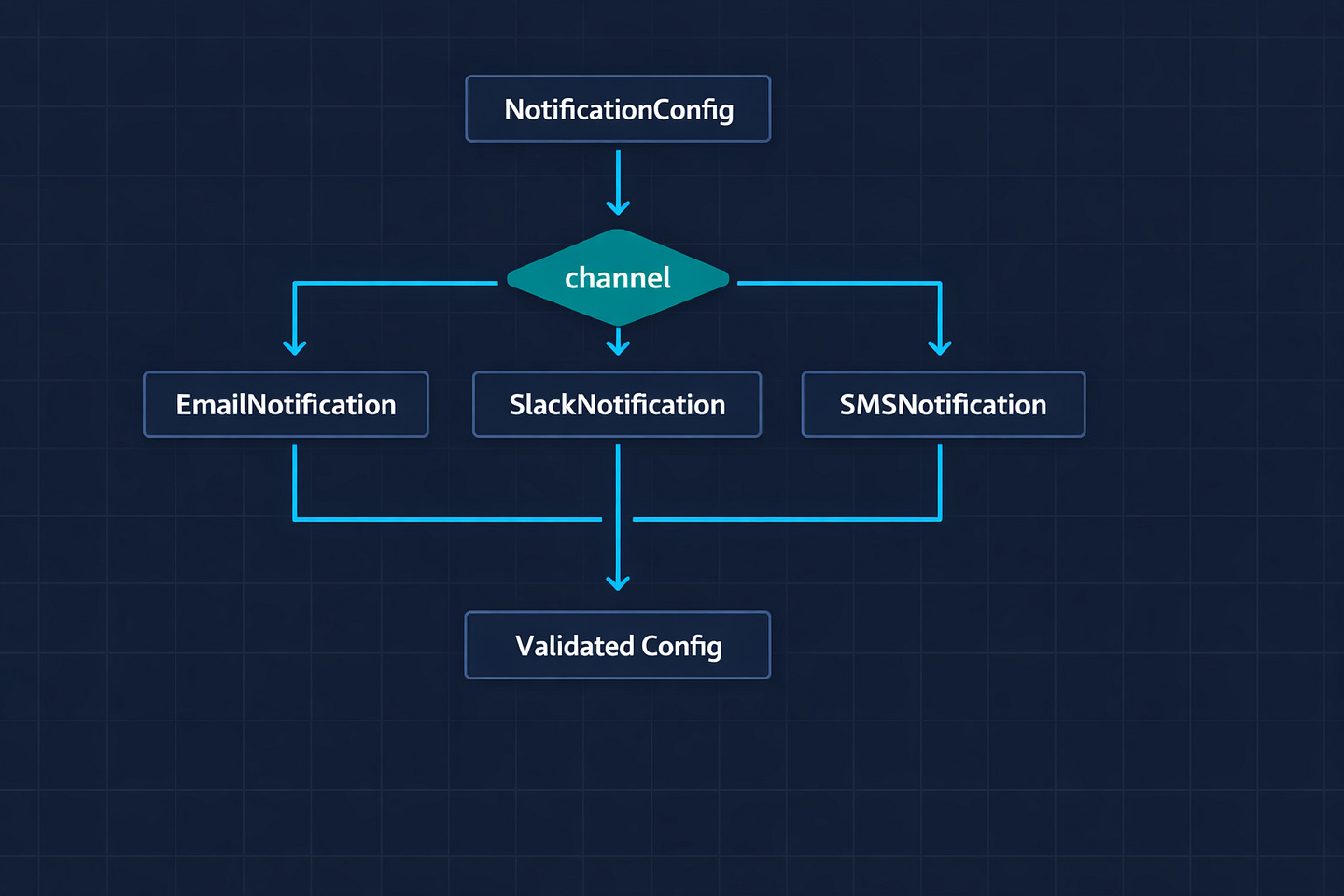
This is the most advanced pattern, but it solves a problem that comes up more often than you’d think: an endpoint that accepts different types of data depending on a type field.
For example, a notification settings endpoint where the payload structure changes based on the notification channel:
from pydantic import BaseModel, Field
from typing import Literal, Union
from typing import Annotated


class EmailNotification(BaseModel):
    channel: Literal[’email’]
    email_address: str
    subject_prefix: str | None = None


class SlackNotification(BaseModel):
    channel: Literal[’slack’]
    webhook_url: str
    mention_users: list[str] = []


class SMSNotification(BaseModel):
    channel: Literal[’sms’]
    phone_number: str
    max_length: int = Field(default=160, le=500)


NotificationConfig = Annotated[
    Union[EmailNotification, SlackNotification, SMSNotification],
    Field(discriminator=’channel’)
]


class UpdateNotificationSettings(BaseModel):
    user_id: int
    notifications: list[NotificationConfig]


@app.put(”/settings/notifications”)
def update_notifications(data: UpdateNotificationSettings):
    for notification in data.notifications:
        match notification.channel:
            case ‘email’:
                setup_email(notification.email_address)
            case ‘slack’:
                setup_slack(notification.webhook_url)
            case ‘sms’:
                setup_sms(notification.phone_number)
    return {”updated”: len(data.notifications)}
The discriminator='channel' tells Pydantic: look at the channel field first, then use it to decide which model to validate against. If someone sends {"channel": "email", "webhook_url": "..."}, Pydantic knows to validate against EmailNotification — and webhook_url isn’t a valid field on that model.
Without discriminated unions, you’d end up with a single bloated model full of optional fields, or a bunch of if/else logic in your endpoint. This pattern keeps everything type-safe, well-documented, and validated automatically.
Bottom Line
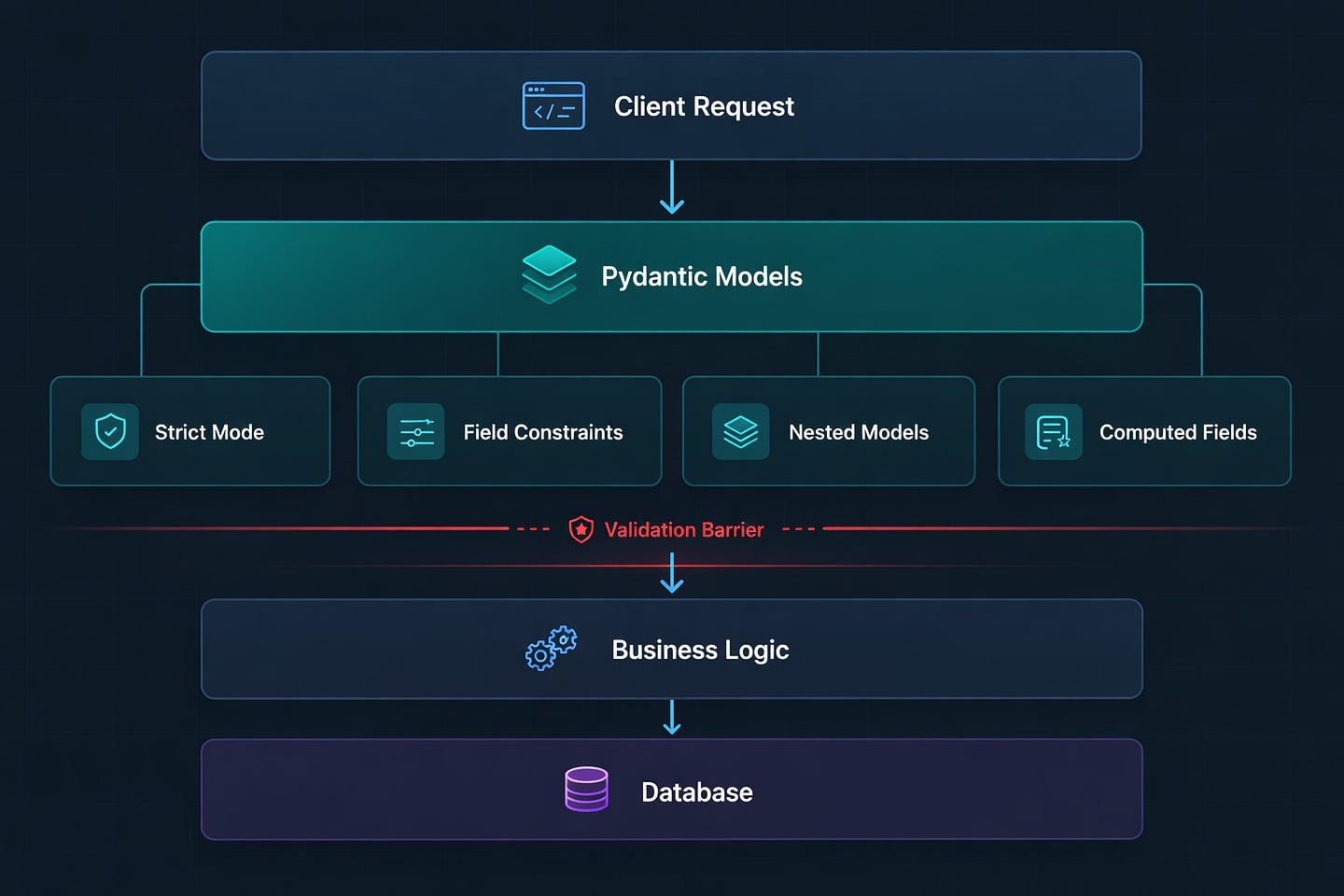
Pydantic is the invisible backbone of every FastAPI application. Most developers learn the basics — define a model, add type hints, let FastAPI handle validation — and stop there. But the difference between a basic API and a production-grade API lives in these details: strict mode for sensitive data, separate models per operation, custom error handlers, reusable types, and computed fields.
The pattern I keep coming back to is this: validate early, validate strictly, and validate once. Push every business rule you can into your Pydantic models. By the time your endpoint code runs, the data should already be clean, typed, and safe. Your endpoint should never be the first line of defense — your models should be.
That "price": "29.99" bug I mentioned at the start? It never would have made it past a strict model. One line of config: ConfigDict(strict=True). That’s the difference between an API that works and an API you can trust.
What’s the strangest input you’ve had to validate in a production API? I once had to validate a JSON field that contained nested YAML. Share your horror stories in the comments.