
JSON, XML, and Data Formats: What Every Backend Engineer Should Know
The invisible glue holding the internet together. Understanding data formats will make you a better API designer.


Every API call you’ve ever made sent data in some format. Usually JSON. Sometimes XML. Occasionally something else entirely.
But have you ever stopped to think about why JSON won? What XML does better? When you’d actually use Protocol Buffers, YAML, or CSV?
Most developers just use whatever format their framework defaults to. That works — until you’re debugging a parsing error at 2 AM, or you’re asked to integrate with a legacy SOAP service, or you need to squeeze every byte out of a mobile API.
Data formats aren’t exciting. But understanding them makes you faster at debugging, better at API design, and more valuable when integrating with external systems.
Let’s break down the formats you’ll actually encounter, when to use each, and the gotchas that catch everyone.
Why Data Formats Matter
When two systems communicate, they need to agree on how to structure data. That’s it. That’s what a data format is — a shared language.
The problem: Computers speak bytes. Humans speak... well, human. Data formats bridge this gap, turning structured information into something that can be:
Transmitted over networks
Parsed by different programming languages
Read by humans (sometimes)
Stored in files or databases
Choose the wrong format, and you get:
Bloated payloads that slow down mobile apps
Parsing errors that crash your services
Integration nightmares with external APIs
Debugging sessions that take hours instead of minutes
JSON: The King of Web APIs
JSON (JavaScript Object Notation) is the default choice for web APIs. If you’ve built anything in the last decade, you’ve used it.
What JSON Looks Like
{
  “id”: 42,
  “username”: “john_doe”,
  “email”: “john@example.com”,
  “is_active”: true,
  “roles”: [”admin”, “editor”],
  “profile”: {
    “bio”: “Backend engineer”,
    “avatar_url”: “https://example.com/avatar.jpg”,
    “social_links”: {
      “twitter”: “@johndoe”,
      “github”: “johndoe”
    }
  },
  “created_at”: “2024-01-15T10:30:00Z”,
  “metadata”: null
}
JSON Data Types
JSON supports exactly 6 data types:
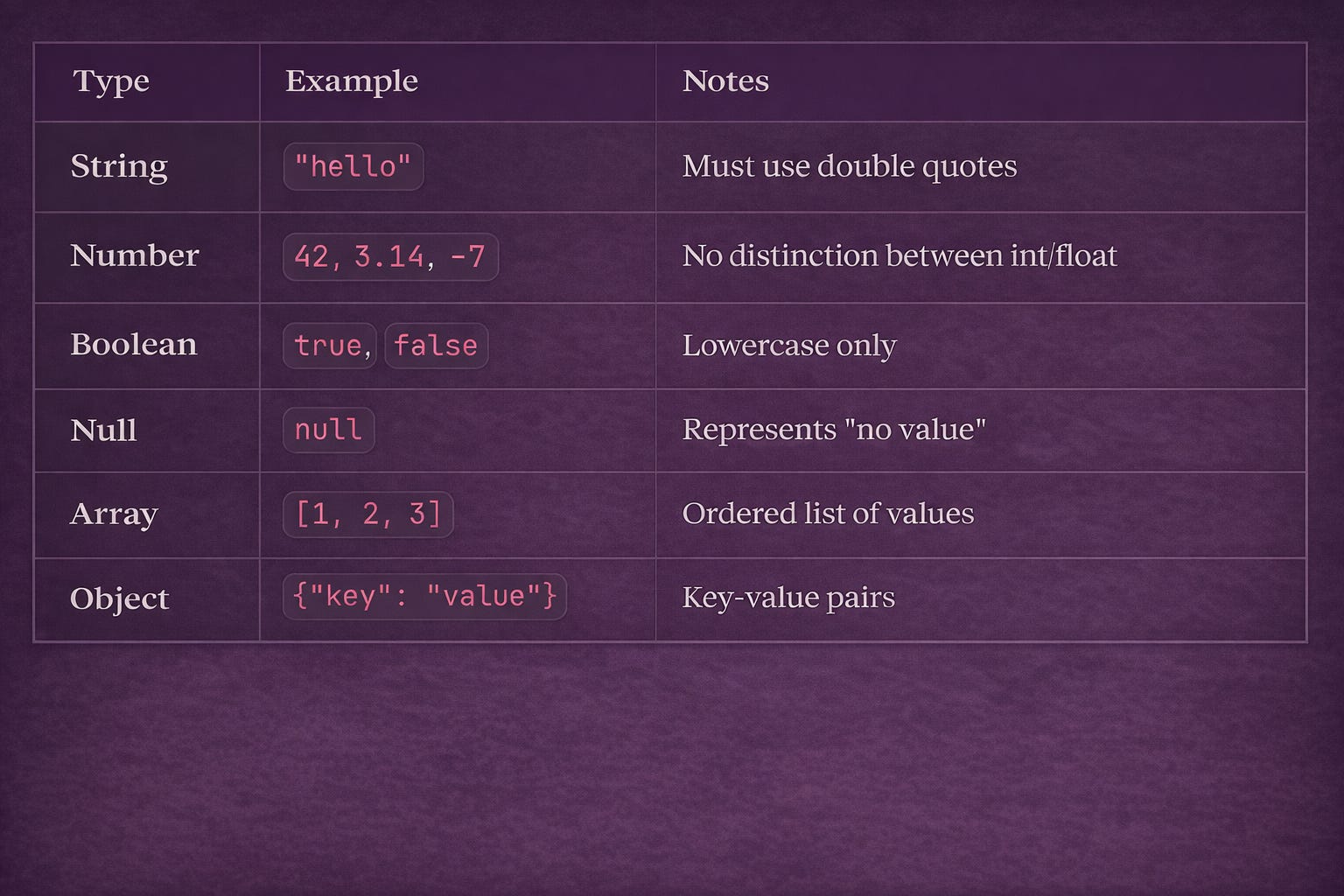
That’s it. No dates, no binary data, no comments. This simplicity is both JSON’s strength and weakness.
Parsing JSON in Different Languages
# Python
import json

# Parse JSON string → Python dict
data = json.loads(’{”name”: “John”, “age”: 30}’)
print(data[”name”])  # “John”

# Python dict → JSON string
json_string = json.dumps({”name”: “John”, “age”: 30})
print(json_string)  # ‘{”name”: “John”, “age”: 30}’

# Pretty print
print(json.dumps(data, indent=2))
// JavaScript
// Parse JSON string → JavaScript object
const data = JSON.parse(’{”name”: “John”, “age”: 30}’);
console.log(data.name); // “John”
// JavaScript object → JSON string
const jsonString = JSON.stringify({ name: “John”, age: 30 });
console.log(jsonString); // ‘{”name”:”John”,”age”:30}’
// Pretty print
console.log(JSON.stringify(data, null, 2));// Go
import “encoding/json”
type User struct {
Name string `json:”name”`
Age int `json:”age”`
}
// Parse JSON → struct
var user User
json.Unmarshal([]byte(`{”name”: “John”, “age”: 30}`), &user)
// Struct → JSON
jsonBytes, _ := json.Marshal(user)JSON Gotchas
1. No Comments Allowed
{
  “name”: “John”  // This is NOT valid JSON!
}
JSON doesn’t support comments. At all. This is intentional — JSON is for data exchange, not configuration. (Use YAML or JSON5 if you need comments.)
2. Trailing Commas Break Everything
{
  “name”: “John”,
  “age”: 30,  // ← This trailing comma is INVALID
}
Many parsers will reject this. Always remove trailing commas.
3. Numbers Have Limits
{
  “big_number”: 9999999999999999999999
}
JSON numbers are typically parsed as 64-bit floats (IEEE 754). Large integers lose precision:
JSON.parse(’{”id”: 9007199254740993}’).id
// Returns: 9007199254740992 (wrong!)
Fix: Use strings for large IDs:
{”id”: “9007199254740993”}4. No Native Date Type
{
  “created_at”: “2024-01-15T10:30:00Z”  // It’s just a string!
}
There’s no date type in JSON. Convention is to use ISO 8601 strings (2024-01-15T10:30:00Z), but the parser won’t automatically convert them.
import json
from datetime import datetime

data = json.loads(’{”created_at”: “2024-01-15T10:30:00Z”}’)
# data[”created_at”] is a string, not a datetime!

# You must parse it manually
created = datetime.fromisoformat(data[”created_at”].replace(”Z”, “+00:00”))
5. No Binary Data
You can’t embed binary data directly in JSON. Common workarounds:
{
  “image”: “data:image/png;base64,iVBORw0KGgoAAAANSUhEUgAA...”,
  “file_url”: “https://example.com/files/document.pdf”
}
Base64 encoding increases size by ~33%. For large files, use URLs instead.
When to Use JSON
✅ REST APIs — Industry standard
✅ Web/mobile apps — Native JavaScript support
✅ Configuration files — Simple and readable (though YAML is often better)
✅ Inter-service communication — Widely supported
✅ Any human-readable data exchange
When NOT to Use JSON
❌ High-performance systems — Binary formats are faster
❌ Large binary data — Base64 bloats size
❌ Streaming data — JSON isn’t designed for streaming
❌ When you need comments — Use YAML or TOML
XML: The Enterprise Veteran
XML (eXtensible Markup Language) was the king before JSON. It’s still everywhere in enterprise systems, SOAP APIs, and document formats (DOCX, SVG, RSS).
What XML Looks Like
<?xml version=”1.0” encoding=”UTF-8”?>
<user id=”42”>
  <username>john_doe</username>
  <email>john@example.com</email>
  <is_active>true</is_active>
  <roles>
    <role>admin</role>
    <role>editor</role>
  </roles>
  <profile>
    <bio>Backend engineer</bio>
    <avatar_url>https://example.com/avatar.jpg</avatar_url>
    <social_links>
      <twitter>@johndoe</twitter>
      <github>johndoe</github>
    </social_links>
  </profile>
  <created_at>2024-01-15T10:30:00Z</created_at>
  <metadata/>  <!-- Self-closing tag for empty element -->
</user>
XML vs JSON: Same Data
JSON:  {”name”: “John”, “age”: 30}           (29 bytes)
XML:   <person><name>John</name><age>30</age></person>  (51 bytes)
XML is roughly 2x larger for the same data. That verbosity adds up.
XML Features JSON Doesn’t Have
1. Attributes
<user id=”42” status=”active”>
  <name>John</name>
</user>
Attributes allow metadata on elements. JSON has no equivalent — everything is a key-value pair.
2. Namespaces
<root xmlns:h=”http://www.w3.org/TR/html4/”
      xmlns:f=”https://www.example.com/furniture”>
  <h:table>
    <h:tr><h:td>HTML Table</h:td></h:tr>
  </h:table>
  <f:table>
    <f:name>Coffee Table</f:name>
  </f:table>
</root>
Namespaces prevent naming collisions when combining documents from different sources.
3. Schema Validation (XSD)
<!-- XML Schema Definition -->
<xs:schema xmlns:xs=”http://www.w3.org/2001/XMLSchema”>
  <xs:element name=”user”>
    <xs:complexType>
      <xs:sequence>
        <xs:element name=”name” type=”xs:string”/>
        <xs:element name=”age” type=”xs:integer”/>
        <xs:element name=”email” type=”xs:string”/>
      </xs:sequence>
      <xs:attribute name=”id” type=”xs:integer” use=”required”/>
    </xs:complexType>
  </xs:element>
</xs:schema>
XML can be validated against schemas. This ensures data structure is correct before processing.
4. Comments
<config>
  <!-- Database settings -->
  <database>
    <host>localhost</host>
    <port>5432</port>  <!-- Default PostgreSQL port -->
  </database>
</config>
Unlike JSON, XML supports comments.
Parsing XML in Python
import xml.etree.ElementTree as ET

xml_string = “”“
<user id=”42”>
  <name>John</name>
  <email>john@example.com</email>
  <roles>
    <role>admin</role>
    <role>editor</role>
  </roles>
</user>
“”“

# Parse XML
root = ET.fromstring(xml_string)

# Access attribute
user_id = root.get(’id’)  # “42”

# Access element text
name = root.find(’name’).text  # “John”

# Iterate over elements
for role in root.findall(’roles/role’):
    print(role.text)  # “admin”, “editor”

# Create XML
new_user = ET.Element(’user’, id=’43’)
ET.SubElement(new_user, ‘name’).text = ‘Jane’
xml_output = ET.tostring(new_user, encoding=’unicode’)
# ‘<user id=”43”><name>Jane</name></user>’
When to Use XML
✅ SOAP APIs — Still common in enterprise/banking
✅ Document formats — DOCX, XLSX, SVG are all XML
✅ RSS/Atom feeds — News, podcasts, blogs
✅ Configuration with validation — When schema enforcement matters
✅ Legacy system integration — Many older systems only speak XML
When NOT to Use XML
❌ New REST APIs — JSON is the standard
❌ Mobile apps — Too verbose, wastes bandwidth
❌ Simple data exchange — Overkill for most use cases
❌ When size matters — 2x larger than JSON
YAML: The Human-Friendly Format
YAML (YAML Ain’t Markup Language) is designed for humans. It’s the go-to for configuration files.
What YAML Looks Like
# User configuration
user:
  id: 42
  username: john_doe
  email: john@example.com
  is_active: true
  roles:
    - admin
    - editor
  profile:
    bio: Backend engineer
    avatar_url: https://example.com/avatar.jpg
    social_links:
      twitter: “@johndoe”
      github: johndoe
  created_at: 2024-01-15T10:30:00Z
  metadata: null
YAML vs JSON: Same Data
# YAML (readable)
database:
  host: localhost
  port: 5432
  name: myapp

# JSON (more punctuation)
{
  “database”: {
    “host”: “localhost”,
    “port”: 5432,
    “name”: “myapp”
  }
}
YAML uses indentation instead of braces. No quotes required for most strings. Comments allowed.
YAML Features
1. Comments
# Database configuration
database:
  host: localhost  # Use ‘db.prod.com’ in production
  port: 5432
2. Multi-line Strings
# Literal block (preserves newlines)
description: |
  This is a long description
  that spans multiple lines.
  Each line break is preserved.

# Folded block (joins lines)
summary: >
  This is a long description
  that will be joined into
  a single line with spaces.
3. Anchors and Aliases (DRY)
# Define once
defaults: &defaults
  adapter: postgres
  host: localhost
  port: 5432

# Reuse
development:
  <<: *defaults
  database: myapp_dev

production:
  <<: *defaults
  host: db.prod.com
  database: myapp_prod
YAML Gotchas
1. Indentation Is Significant
# WRONG (inconsistent indentation)
user:
  name: John
    age: 30  # Error! Too much indentation

# RIGHT
user:
  name: John
  age: 30
Tabs vs spaces will break your YAML. Use spaces only.
2. Unexpected Type Coercion
# These are all booleans!
active: yes      # true
enabled: no      # false
flag: on         # true
switch: off      # false

# These are NOT strings!
version: 1.0     # float, not string “1.0”
country: NO      # boolean false, not string “NO” (Norway)

# Force strings with quotes
version: “1.0”
country: “NO”
This is YAML’s most infamous gotcha. Always quote strings that could be misinterpreted.
3. Security: Don’t Parse Untrusted YAML
WARNING: YAML parsers can execute arbitrary code when processing certain specially-crafted payloads. This is a well-known vulnerability in deserialization attacks.
The vulnerability involves YAML tags that can invoke Python objects or system commands. Malicious YAML can execute shell commands like deleting files or compromising your system.
Never parse YAML from untrusted sources with yaml.load(). Always use yaml.safe_load():
import yaml

# DANGEROUS - can execute code
data = yaml.load(untrusted_yaml)

# SAFE - only loads basic types
data = yaml.safe_load(untrusted_yaml)
The attack pattern:
Attackers can craft YAML that uses Python object serialization tags (starting with !!python/) to execute system commands. For example, a payload could invoke operating system functions to delete directories or steal data.
Protection:
Always use
safe_load()instead ofload()Never trust YAML from external sources
Validate YAML structure before parsing
Use schema validation when possible
Parsing YAML in Python
import yaml

yaml_string = “”“
database:
  host: localhost
  port: 5432
users:
  - name: John
    role: admin
  - name: Jane
    role: editor
“”“

# Parse YAML (use safe_load!)
data = yaml.safe_load(yaml_string)
print(data[’database’][’host’])  # “localhost”
print(data[’users’][0][’name’])  # “John”

# Python dict → YAML
config = {’app’: {’debug’: True, ‘port’: 8000}}
yaml_output = yaml.dump(config, default_flow_style=False)
print(yaml_output)
# app:
#   debug: true
#   port: 8000
When to Use YAML
✅ Configuration files — Docker Compose, Kubernetes, CI/CD
✅ Human-edited data — Much more readable than JSON
✅ When you need comments — JSON doesn’t support them
✅ DevOps tooling — Ansible, GitHub Actions, etc.
When NOT to Use YAML
❌ API responses — Use JSON instead
❌ Untrusted input — Security risks with full YAML parsing
❌ Programmatic generation — Easy to create invalid YAML
❌ When types matter — Too much implicit coercion
Other Formats You’ll Encounter
CSV (Comma-Separated Values)
id,name,email,role
1,John,john@example.com,admin
2,Jane,jane@example.com,editor
3,Bob,bob@example.com,viewer
Use for: Spreadsheet data, bulk imports/exports, data analysis
Gotchas: No standard for escaping, no nested data, no types
import csv

# Read CSV
with open(’users.csv’) as f:
    reader = csv.DictReader(f)
    for row in reader:
        print(row[’name’], row[’email’])

# Write CSV
with open(’output.csv’, ‘w’, newline=’‘) as f:
    writer = csv.DictWriter(f, fieldnames=[’id’, ‘name’])
    writer.writeheader()
    writer.writerow({’id’: 1, ‘name’: ‘John’})
Protocol Buffers (Protobuf)
// user.proto
message User {
  int32 id = 1;
  string username = 2;
  string email = 3;
  bool is_active = 4;
  repeated string roles = 5;
}
Use for: High-performance APIs (gRPC), internal microservices
Benefits: 3–10x smaller than JSON, strongly typed, fast parsing
Trade-off: Not human-readable, requires schema
MessagePack
Binary JSON. Same data model as JSON, but binary encoded.
import msgpack

data = {”name”: “John”, “age”: 30}

# Pack (serialize)
packed = msgpack.packb(data)  # b’\x82\xa4name\xa4John\xa3age\x1e’

# Unpack (deserialize)
unpacked = msgpack.unpackb(packed)
Use for: When you need JSON semantics but smaller size
Benefits: ~50% smaller than JSON, faster parsing
TOML (Tom’s Obvious Minimal Language)
# Config file
[database]
host = “localhost”
port = 5432

[server]
debug = true
workers = 4

[[users]]
name = “John”
role = “admin”

[[users]]
name = “Jane”
role = “editor”
Use for: Configuration files (Cargo.toml, pyproject.toml)
Benefits: More structured than YAML, less error-prone
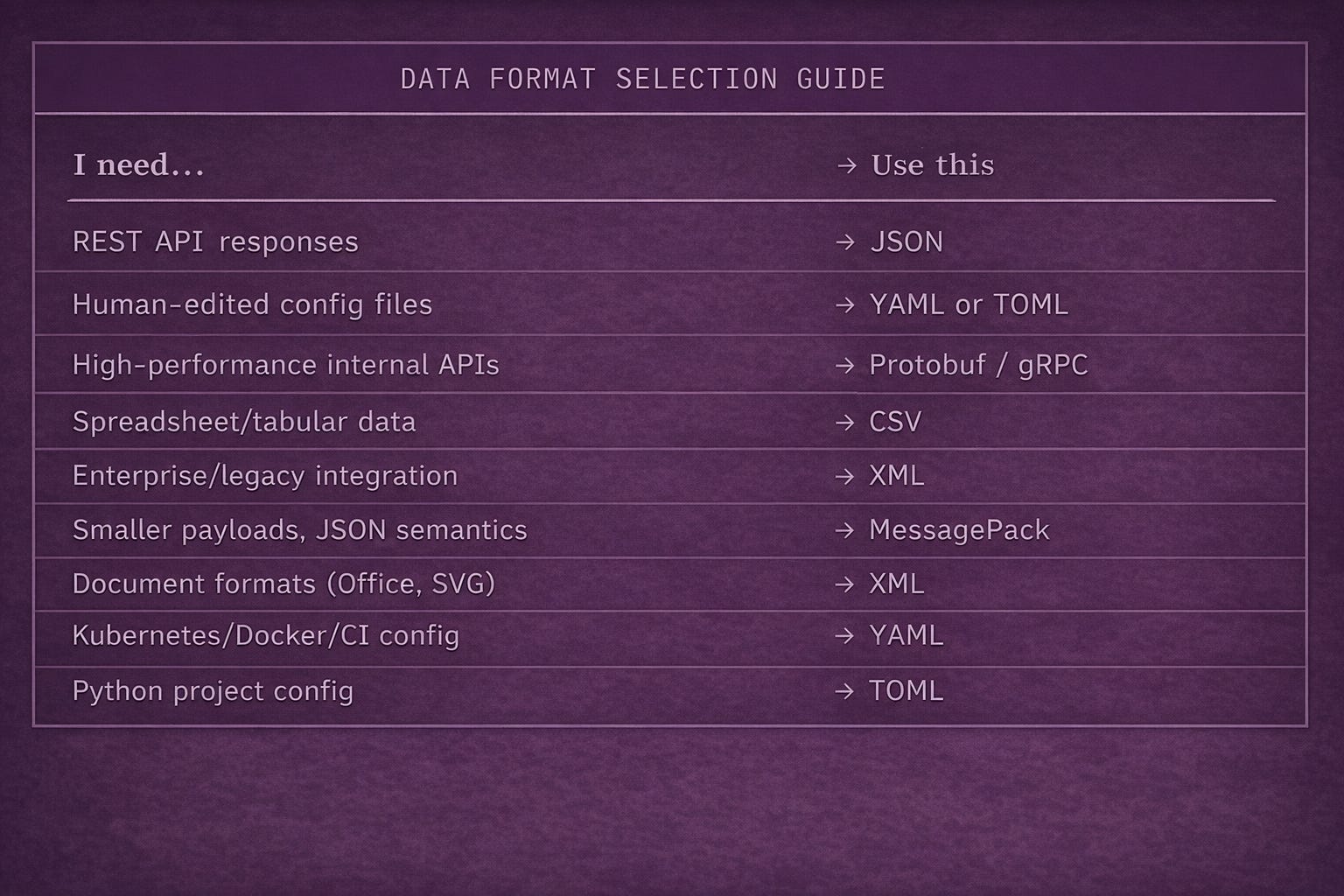
Quick Reference: Choosing a Format
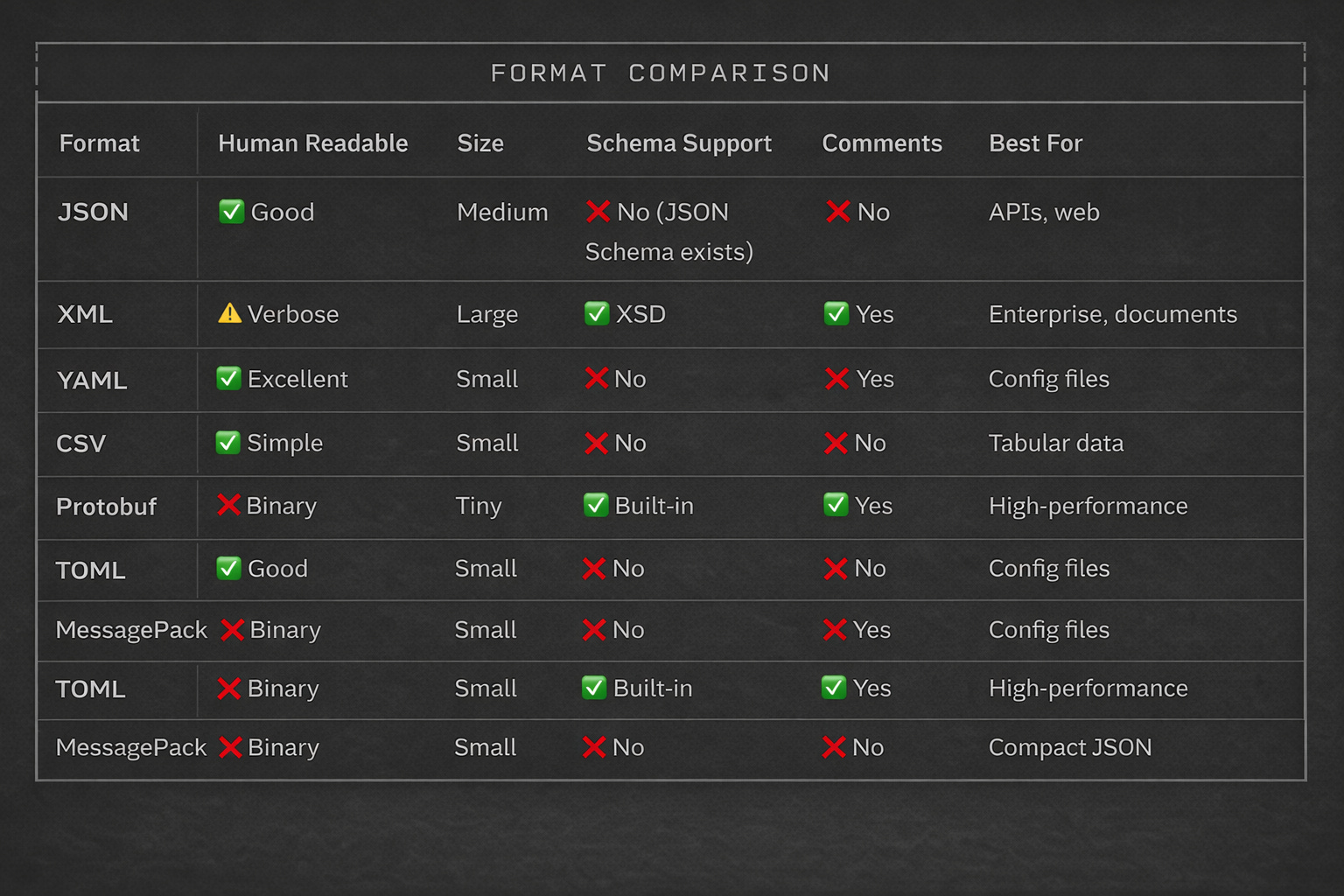
Format Comparison Table
The Bottom Line
Data formats are the unsung heroes of backend development. Getting them right means:
Faster debugging — You recognize format issues instantly
Better API design — You choose the right format for each use case
Smoother integrations — You can work with any system
The practical advice:
Default to JSON for APIs — It’s the standard
Use YAML for config files humans edit
Consider Protobuf when performance matters
Know XML for enterprise integrations
Always handle edge cases — Dates, large numbers, binary data
You don’t need to memorize every format. But understanding the trade-offs makes you a better engineer.
Learning backend development? I share practical engineering insights weekly. Follow along.
Originally published by Anas Issath — Backend engineer. Building systems that scale, securing what ships, and teaching what I’ve broken in production.