

The Django Migration Bug That Took Down Our Production Database
A 47-minute table lock from one line of code.

It was 2:14 PM on a Wednesday. We deployed a routine release — three new features, a handful of bug fixes, and one data migration. Standard stuff. The deployment pipeline ran python manage.py migrate as part of the release, just like it always did.
By 2:16 PM, our Slack was on fire.
“API is timing out.” “Dashboard won’t load.” “Is the site down?”
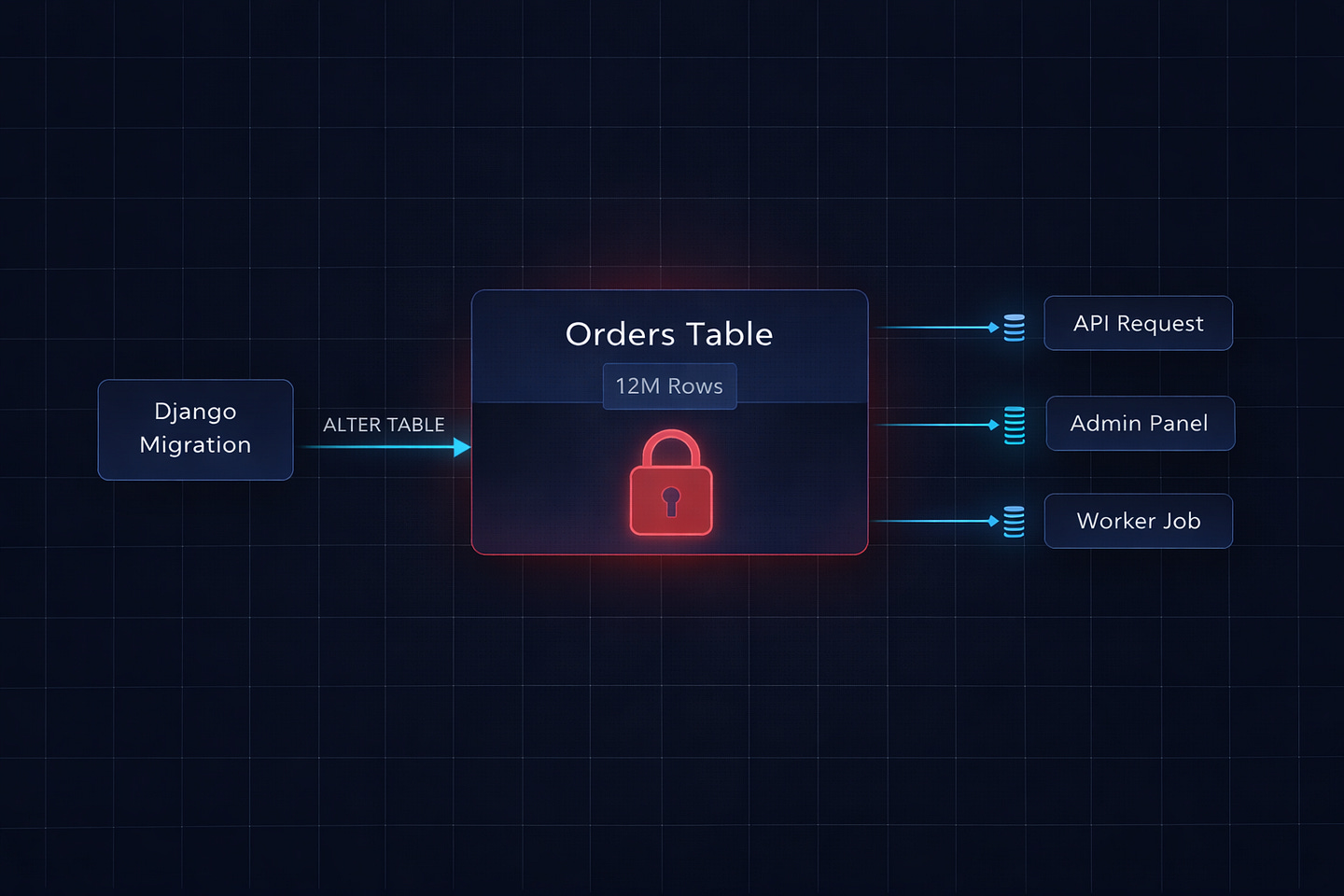
Every request that touched our orders table — which was roughly 70% of our API — was hanging. Not failing. Hanging. Connections were piling up, waiting for something. Our PostgreSQL connection pool hit its limit in under a minute. New requests started getting rejected with connection errors.
The database wasn’t down. It was locked.
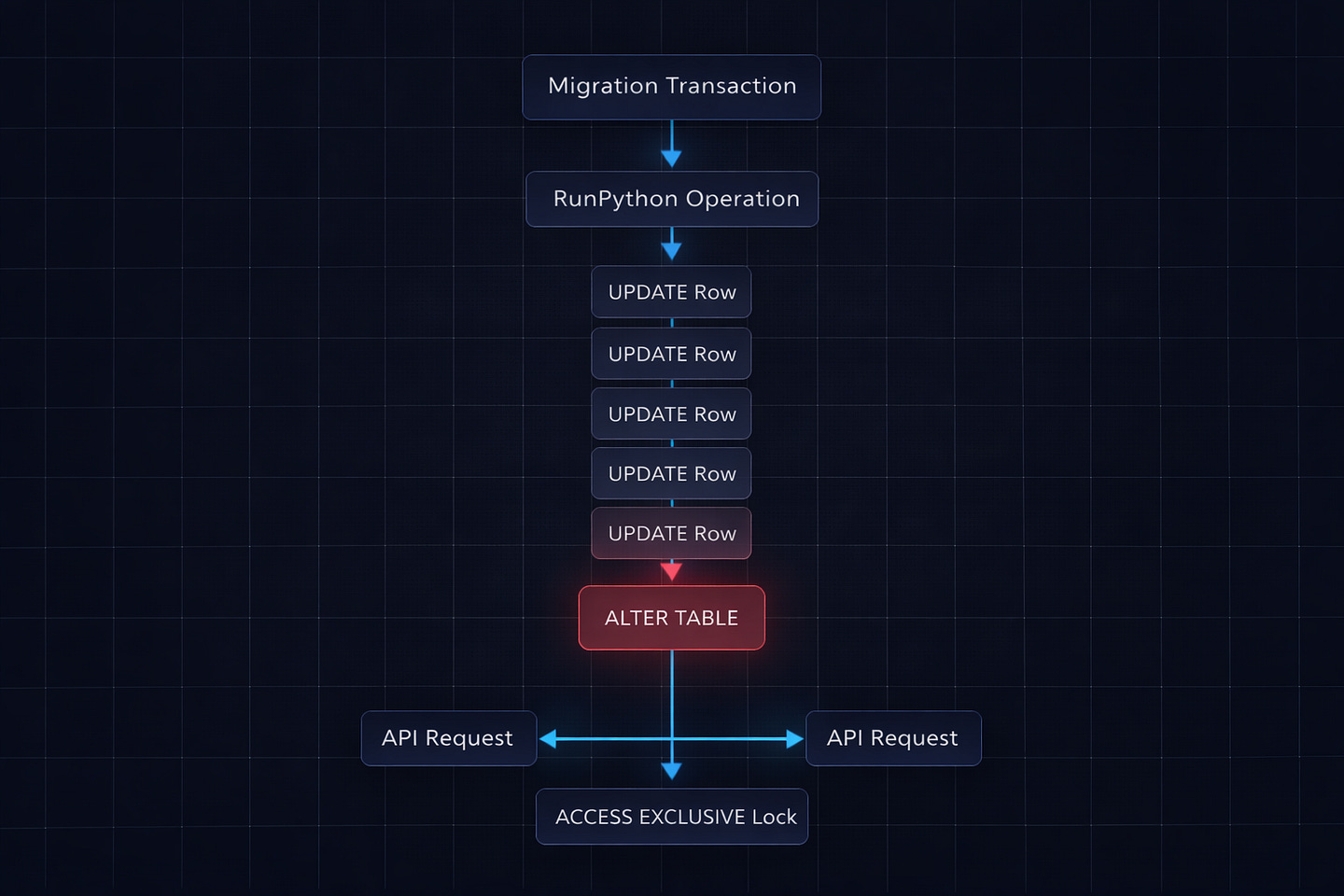
One migration had taken an ACCESS EXCLUSIVE lock on the orders table — a table with 12 million rows — and was running a RunPython operation that updated every single row, one at a time, inside a single transaction. While that transaction held the lock, nothing else could read from or write to that table. Not our API. Not our admin panel. Not our background workers. Nothing.
It took 47 minutes for the migration to finish. Forty-seven minutes of effective downtime during business hours because of one migration I wrote in about five minutes.
This is the story of what went wrong, why Django’s migration system let it happen, and the exact patterns I now follow to make sure it never happens again.
What Actually Happened
The migration itself was embarrassingly simple. We had an orders table with a currency field that was nullable. Some old orders had NULL values where they should have had "USD". The task was straightforward: backfill the nulls with the default currency, then make the field non-nullable.
Here’s what I wrote:
# 0042_backfill_currency.py

from django.db import migrations


def backfill_currency(apps, schema_editor):
    Order = apps.get_model(’orders’, ‘Order’)
    for order in Order.objects.filter(currency__isnull=True):
        order.currency = “USD”
        order.save()


class Migration(migrations.Migration):
    dependencies = [
        (’orders’, ‘0041_previous_migration’),
    ]

    operations = [
        migrations.RunPython(backfill_currency, migrations.RunPython.noop),
        migrations.AlterField(
            model_name=’order’,
            name=’currency’,
            field=models.CharField(max_length=3, default=’USD’),
        ),
    ]
Looks harmless, right? Loop through orders with null currency, set it to USD, save. Then alter the field to be non-nullable with a default.
Here’s what actually happened at the database level:
Django started a transaction (migrations run inside transactions by default)
The
RunPythonoperation selected all orders with null currency — about 180,000 rowsIt updated them one by one with individual
UPDATEstatementsWhile the transaction was open, the
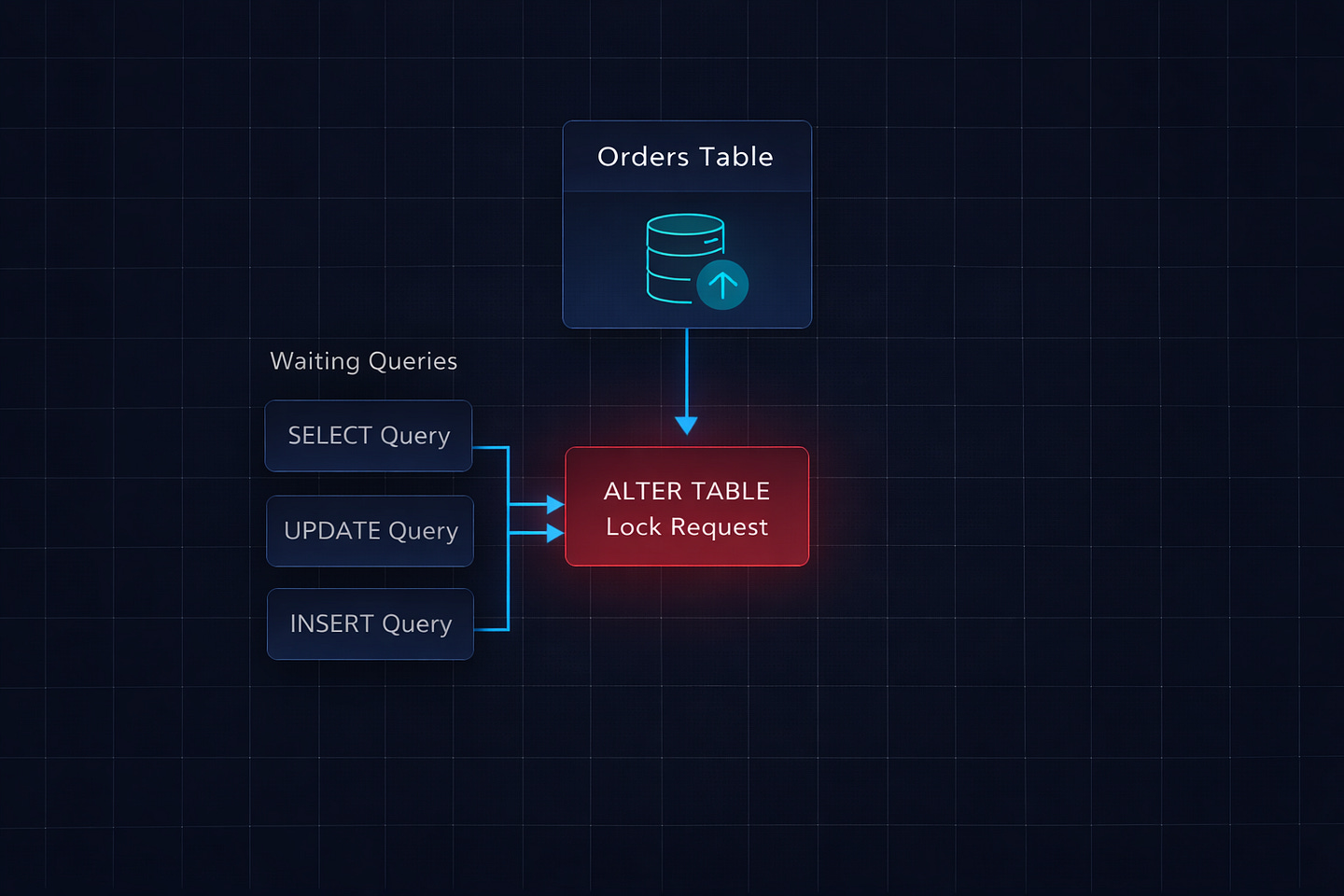
AlterFieldoperation tried to runALTER TABLEon the same tableALTER TABLErequires anACCESS EXCLUSIVElock — the most aggressive lock PostgreSQL hasPostgreSQL queued the lock request, but it couldn’t acquire it until the transaction finished
Meanwhile, every other query on the
orderstable — reads and writes — queued behind the pending lock
Wait, it gets worse. Because all of this was in one transaction, the lock wasn’t just held during the ALTER TABLE. PostgreSQL’s lock queue meant that even normal SELECT queries on the orders table were blocked as soon as the ALTER TABLE entered the lock queue. The ALTER statement was waiting for the RunPython to finish, and everything else was waiting for the ALTER.
The 180,000 individual UPDATE statements took 47 minutes. During all 47 minutes, the table was effectively frozen.
Why Django Let This Happen
Django’s migration framework is powerful, but it has a few default behaviors that become dangerous at scale:
Migrations run in transactions. By default, each migration file executes inside a single database transaction. This is usually a good thing — if something fails, everything rolls back cleanly. But it also means that if your migration has both a data operation (RunPython) and a schema operation (AlterField), they both happen in the same transaction. The schema change can’t start until the data operation finishes, but the lock request for the schema change blocks everything else immediately.
RunPython has no batching. When you write a loop inside RunPython, Django doesn’t do anything special about it. It’s just Python code. If you loop through 180,000 rows and call .save() on each one, that’s 180,000 individual SQL queries inside a single transaction. Django’s ORM doesn’t batch these. It doesn’t chunk them. It just runs them, one after another, holding the transaction open the entire time.
AddField with a default rewrites the table. When you add a NOT NULL field with a default value, Django generates SQL like ALTER TABLE orders ADD COLUMN currency VARCHAR(3) DEFAULT 'USD' NOT NULL. On older versions of PostgreSQL (before 11), this would physically rewrite every row in the table. Even on PostgreSQL 11+, which handles some cases more efficiently, combining this with a data migration in the same transaction is a recipe for long locks.
No warnings about dangerous operations. Django’s makemigrations doesn’t warn you that your migration might lock a table for an extended period. It doesn’t know how many rows you have. It doesn’t flag combining RunPython with schema changes. It generates the migration and trusts you to know what you’re doing.
The Fix: How I Should Have Written It
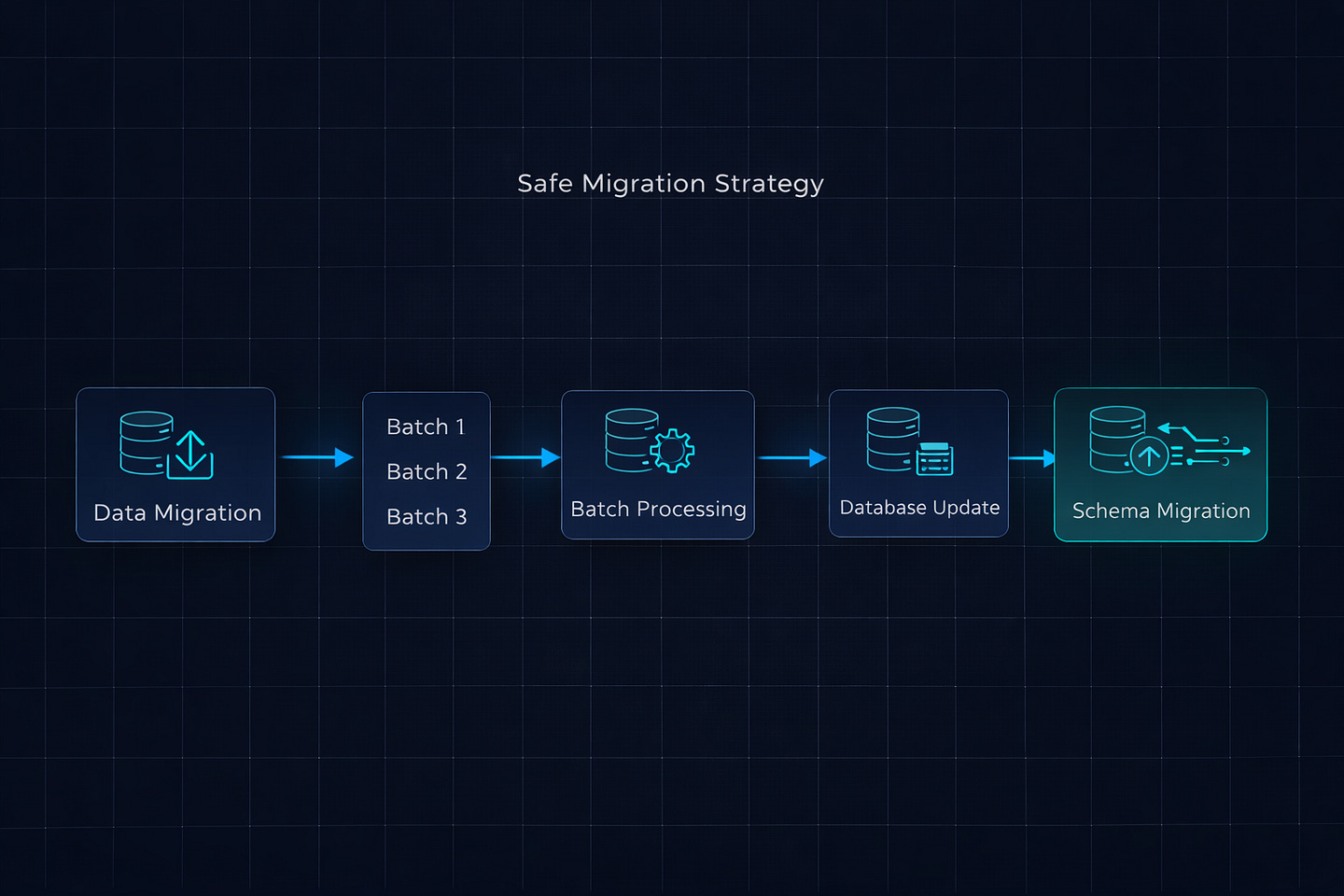
After the incident, I rewrote the migration using the patterns I now follow for every data migration on tables with more than a few thousand rows. The key principles: separate data migrations from schema migrations, process data in batches, and never hold long transactions.
Step 1: Data Migration in Batches (Separate File)
# 0042_backfill_currency_data.py

from django.db import migrations


def backfill_currency(apps, schema_editor):
    Order = apps.get_model(’orders’, ‘Order’)

    batch_size = 2000
    while True:
        # Get a batch of IDs to update
        batch_ids = list(
            Order.objects.filter(currency__isnull=True)
            .values_list(’id’, flat=True)[:batch_size]
        )

        if not batch_ids:
            break

        # Bulk update — one query for 2000 rows instead of 2000 queries
        Order.objects.filter(id__in=batch_ids).update(currency=’USD’)


class Migration(migrations.Migration):
    atomic = False  # Critical — don’t wrap in a single transaction

    dependencies = [
        (’orders’, ‘0041_previous_migration’),
    ]

    operations = [
        migrations.RunPython(backfill_currency, migrations.RunPython.noop),
    ]
Three critical differences from the original:
atomic = False at the migration level. This tells Django not to wrap the entire migration in a single transaction. Each UPDATE query commits immediately. If the migration fails halfway through, you can safely rerun it — the filter(currency__isnull=True) query will only find the remaining unprocessed rows.
Batch processing with bulk_update. Instead of looping through 180,000 rows and calling .save() on each one, we grab 2000 IDs at a time and update them in a single UPDATE ... WHERE id IN (...) query. That’s 90 queries instead of 180,000.
No schema changes in the same migration. The data backfill is isolated in its own migration file. It runs, commits, and releases all locks before any schema change happens.
Step 2: Schema Migration (Separate File)
# 0043_make_currency_not_null.py

from django.db import migrations, models


class Migration(migrations.Migration):
    dependencies = [
        (’orders’, ‘0042_backfill_currency_data’),
    ]

    operations = [
        migrations.AlterField(
            model_name=’order’,
            name=’currency’,
            field=models.CharField(max_length=3, default=’USD’),
        ),
    ]
This migration runs after the data is already backfilled. The ALTER TABLE still takes a brief lock, but since all the data work is already done, it completes in milliseconds — not minutes.
The Result
The original migration: 47 minutes of table lock, effective downtime. The rewritten migration: data backfill took 8 seconds with no locks, schema change took 200 milliseconds with a brief lock. Total time: under 10 seconds. Zero downtime.
The Rules I Follow Now
After this incident, I wrote a set of migration rules for our team. These are pinned in our engineering Slack channel and enforced in code reviews. Every one of them exists because we learned it the hard way.
Rule 1: Never Mix Data and Schema Operations
Data migrations (RunPython, RunSQL with UPDATE statements) and schema migrations (AddField, AlterField, RemoveField) go in separate migration files. Always. No exceptions.
# BAD — one file does both
operations = [
    migrations.RunPython(populate_new_field),
    migrations.AlterField(model_name=’order’, ...),
]


# GOOD — two separate files
# 0042_populate_new_field.py → RunPython only
# 0043_alter_field.py → AlterField only
Rule 2: Always Use atomic = False for Data Migrations
Any migration that runs RunPython on a table with more than a few thousand rows should set atomic = False. This prevents the entire data operation from being wrapped in a single transaction.
class Migration(migrations.Migration):
    atomic = False  # Each batch commits independently
    # ...
Rule 3: Batch Everything
Never loop through a queryset and call .save() on individual objects inside a migration. Use bulk_update, .update(), or process in chunks.
# BAD — 180,000 individual UPDATE queries
for order in Order.objects.filter(currency__isnull=True):
    order.currency = ‘USD’
    order.save()


# GOOD — 90 bulk UPDATE queries
batch_size = 2000
while True:
    ids = list(
        Order.objects.filter(currency__isnull=True)
        .values_list(’id’, flat=True)[:batch_size]
    )
    if not ids:
        break
    Order.objects.filter(id__in=ids).update(currency=’USD’)
Rule 4: Add Columns as Nullable First
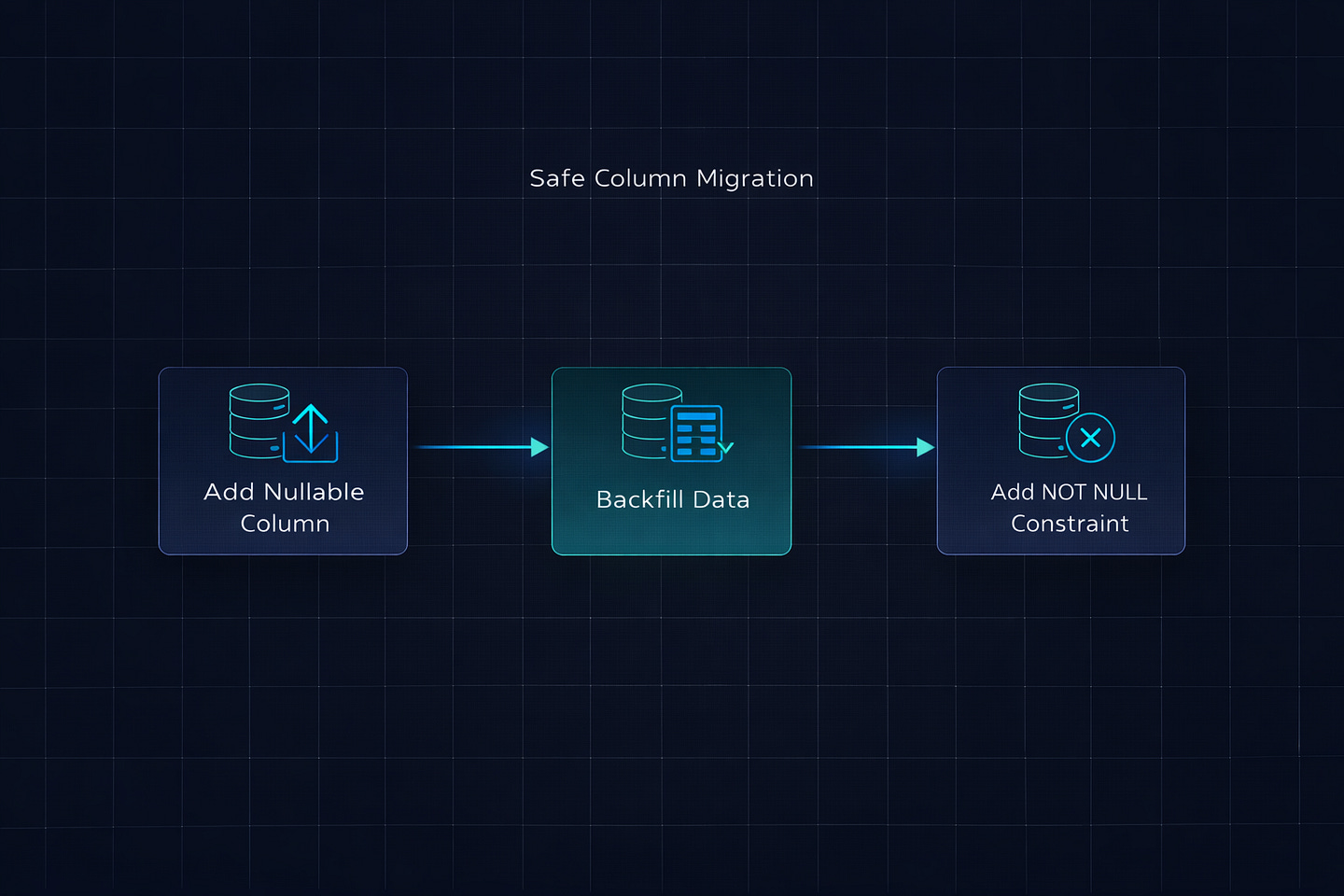
When adding a new column to a large table, always make it nullable first. A nullable column addition is nearly instant in PostgreSQL — it doesn’t rewrite the table. Then backfill the data. Then add the NOT NULL constraint separately.
# Step 1: Add nullable column (instant)
migrations.AddField(
    model_name=’order’,
    name=’region’,
    field=models.CharField(max_length=50, null=True, blank=True),
)

# Step 2: Backfill data (separate migration, atomic=False)
# Step 3: Set NOT NULL (separate migration, brief lock)
If you try to add a NOT NULL column with a default directly on a table with millions of rows, Django generates SQL that can lock the table for an extended period while it sets the default on every existing row.
Rule 5: Use sqlmigrate Before You Deploy
Before running any migration in production, check what SQL it will actually execute:
python manage.py sqlmigrate orders 0042This prints the exact SQL statements Django will run. If you see a big ALTER TABLE on a table you know has millions of rows, that’s your signal to reconsider.
I review the sqlmigrate output for every migration during code review now. It takes 30 seconds and has prevented at least three potential incidents since the original one.
Rule 6: Create Indexes Concurrently
Standard CREATE INDEX takes a lock that blocks writes to the table. On a table with millions of rows, creating an index can take minutes. PostgreSQL has CREATE INDEX CONCURRENTLY, which doesn’t block writes — but Django doesn’t use it by default.
# Use AddIndex with a custom RunSQL for concurrent creation
class Migration(migrations.Migration):
    atomic = False  # CONCURRENTLY can’t run inside a transaction

    operations = [
        migrations.RunSQL(
            “CREATE INDEX CONCURRENTLY idx_orders_region ON orders (region);”,
            reverse_sql=”DROP INDEX CONCURRENTLY idx_orders_region;”,
        ),
    ]
Note the atomic = False — CREATE INDEX CONCURRENTLY cannot run inside a transaction. If you leave atomic as the default True, PostgreSQL will throw an error.
The Pre-Deploy Migration Checklist
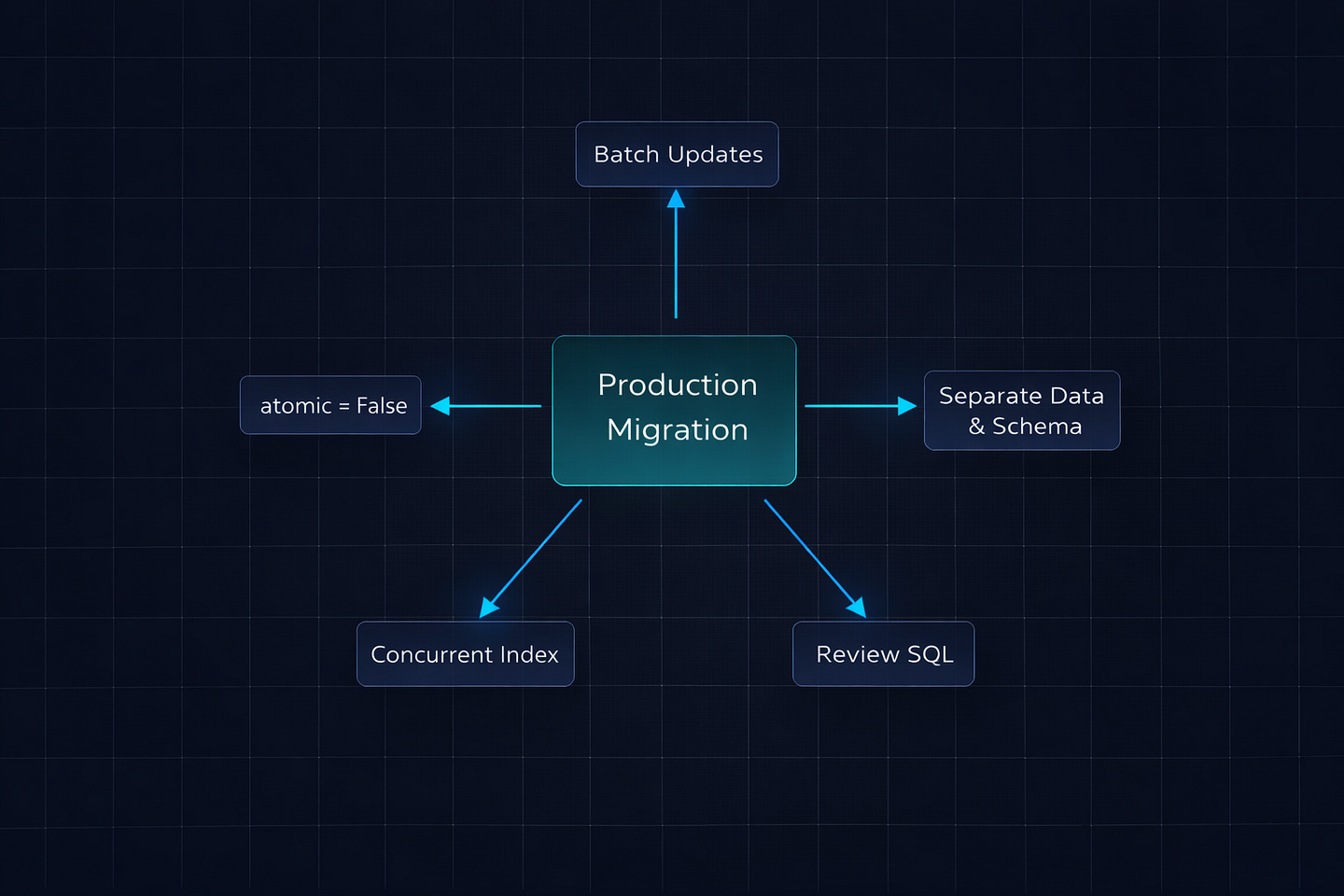
I keep this checklist in our team’s wiki. Every migration gets reviewed against it before it hits production:
Is this a data migration on a table with more than 10,000 rows? If yes → atomic = False, batch processing, separate from schema changes.
Does it add a new column to a large table? If yes → add as nullable first, backfill separately, add NOT NULL constraint last.
Does it create a new index? If yes → use CREATE INDEX CONCURRENTLY with atomic = False.
Does it rename or remove a column? If yes → deploy code changes first (stop using the old column), then remove it in a separate deployment.
Have you run sqlmigrate and reviewed the output? If no → do it now.
Have you tested this on a staging database with production-like data volume? If no → do it now. A migration that runs in 2 seconds on 1,000 rows might take 30 minutes on 10 million.
Bottom Line
Django’s migration system is one of the best in any web framework. It handles 95% of migrations perfectly. But that other 5% — the migrations on large tables, the data backfills, the schema changes in production — can take down your application if you don’t understand what’s happening at the database level.
The core principle is simple: fast schema changes and batched data operations, never in the same transaction. Separate your data migrations from your schema migrations. Use atomic = False for anything that touches a lot of rows. Run sqlmigrate before every production deploy.
That 47-minute outage cost us roughly 2,300 failed API requests and a very uncomfortable post-mortem meeting. The rewritten migration took under 10 seconds with zero user impact. The difference wasn’t clever engineering — it was just knowing which defaults to override.
What’s the worst migration disaster you’ve experienced? I know I’m not the only one with a war story involving ALTER TABLE and a table that was way bigger than expected. Share yours in the comments.
What’s Next?
If you found this valuable, I’d appreciate your help. Hit the like ♥️ to help others discover this article. Share it with engineers who need to understand distributed systems.
Subscribe if you want more backend engineering deep dives like this delivered to your inbox. I write about Django, Python, databases, and system design—the real stuff we deal with in production.
Your 10 minutes reading this means a lot. Let’s build smarter systems together.